
Asset Giant turns any tool, machine or piece of kit into something you can look up in a second: a QR code asset tag you design and print yourself, on the printer you already own, that opens the item’s full record when a phone camera scans it. One scan powers check-in, check-out, stocktakes and site moves, with no scanner to buy and no labels to order.
What a QR code asset tag is
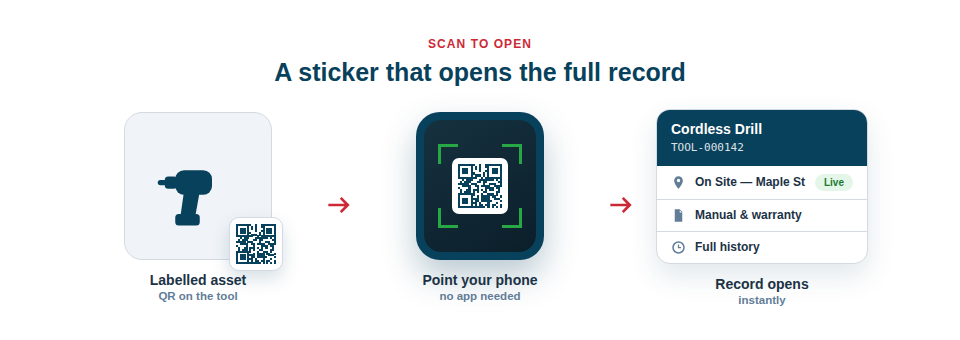
A QR asset tag is a sticker that carries a small square code unique to one asset. The code holds a short web address, and nothing else. Point a phone camera at it and the phone offers to open that address; Asset Giant reads which sticker it was and opens the matching record — photos, location, who has it, its history and any documents attached.
Because the code is unique to the item rather than to the type of item, two identical drills carry two different tags, and each scan reaches the right one. That is the difference between a QR asset tag and an ordinary printed label: a written label tells you what something is; a QR tag lets you act on it.
- Instant lookup. Scan to open the record in seconds, with no typing and no searching.
- Everyday workflows. The same scan drives Check Items In & Out, Stocktakes & Inventory Audits and “where does this go back to?” questions.
- No special hardware. Any modern phone camera reads the code; there is nothing to buy, charge or replace.
- Fewer mistakes. Scanning the exact item removes the typos and mix-ups that creep in when people key references by hand.
What to print on a QR asset label
The QR code does the identifying, but a good label is readable before anyone scans it. Every label prints from a design you control in the Custom Label Designer, so you choose exactly what appears alongside the code:
- The Asset ID — the short reference Asset Giant generates for every item, such as TOOL-000142. It is the number a person reads out over the phone or writes on a job sheet, so it belongs on every label. See Automatic Asset IDs.
- The asset name — “DeWalt DCS391 Circular Saw” tells a finder what they are holding without a scan.
- Your company name — a header line such as “Property of MC Media” makes ownership obvious on a shared site and discourages a tool from walking.
- A contact number — a footer line such as “Found it? Call 020 7946 0123” gives a finder a way to return the item even if they never scan the code.
- Your logo, and optionally the asset photo, sized with a slider.
- Extra fields for bigger labels — asset type, status, location, project, client, manufacturer, model number, serial number, purchase date, supplier, warranty expiry, or any custom field you have added. Text shrinks automatically to fit the label, so nothing spills onto the next sticker.
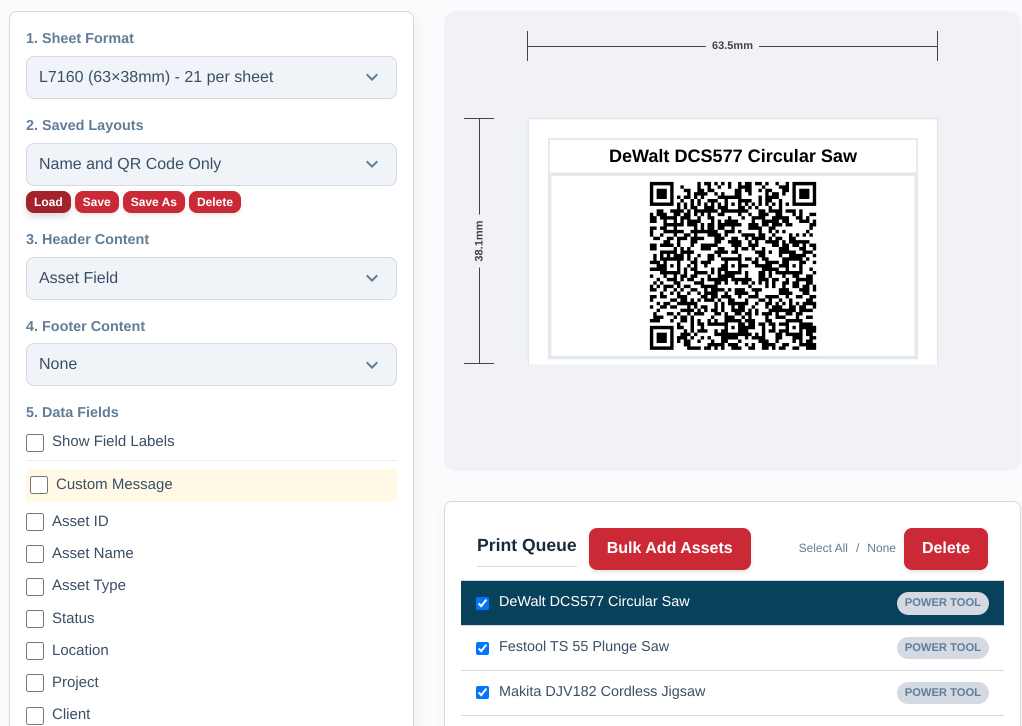
Colours, a border and the edge spacing are yours to set as well, and a finished design can be saved as a layout so labelling new kit is a repeatable routine rather than a fresh design each time.
What size label for what kit
Labels print onto standard label sheets you can buy from any stationer, so the sizes available are the sizes the sheets come in. Buy the sheet, pick its code in the print queue, and every label lands on its die-cut. Start from the item:
- Hand tools and small kit — 46 × 21 mm (Avery L4778, 48 per sheet) or 38 × 21 mm (L7651, 65 per sheet). Room for the code, the Asset ID and a short name.
- Drills, levels, most general tools — 63.5 × 38.1 mm (Avery L7160, 21 per sheet). The all-rounder: code, Asset ID, name, a header and a footer all fit.
- Bigger power tools — 70 × 42 mm (L7168, 21 per sheet), with a generous code that scans at arm’s length.
- Flight cases, machines and plant — 99.1 × 38.1 mm (Avery L7163, 14 per sheet) or 99.1 × 67.7 mm (L7165, 8 per sheet), with room for a serial number, a location and a full company header.
- Cases, batteries and cable drums — 35 mm or 25 mm squares (35 or 70 per sheet). Code-first labels where there is no flat run of space.
- Cable ends and the smallest items — 20 mm round, 88 per sheet.
- US Letter sheets — Avery 5160 (2.625 × 1 in, 30 per sheet), 5161 (4 × 1 in, 20), 5163 (4 × 2 in, 10) and 5164 (4 × 3.33 in, 6), laid out to the Letter page rather than A4.
Larger A4 formats are there for cases and cabinets where a label doubles as a sign — L7159, L7161, L7162, L7166, L7169 and the 200 × 60 mm L7171. The full list is in Standard Label Sheet Support.
The code holds a short web address rather than a long one, which is what keeps it readable at the smaller sizes.
Label materials: what survives a site
The sheet decides the size; the stock decides how long the label lasts. Most manufacturers sell the same layouts in more than one material, so you can change material without changing your design.
| Label stock | Stands up to | Use it for |
|---|---|---|
| Paper | Indoor handling and dry storage | Office equipment, stockroom shelving, anything that stays inside |
| Polyester | Water, oil, solvent, abrasion and sunlight | Vans, sites, hire stock, outdoor plant |
| Vinyl | Water, knocks and curved or flexing surfaces | Cable drums, round handles, cases and covers |
A few things worth knowing before you buy a box:
- Outdoors, buy polyester. Paper lifts at the corners within weeks of getting wet, and the print fades in sunlight. Polyester marked “durable” or “weatherproof” is the stock to ask for.
- A jet wash beats almost any adhesive label if it is aimed straight at an edge. On plant that gets washed down, use polyester, then cover the applied label with a clear laminate patch, and put it somewhere the lance does not point.
- Solvent, fuel and brake cleaner take the ink off paper and off some inkjet prints. A laser-printed polyester label survives a wipe-down; an inkjet one usually does not.
- Clear packing tape over the label is the cheap version of a laminate, and it works. It is worth the extra few seconds on any tool that lives in a van.
Placement. Somewhere flat, clean and visible, away from the grips, edges and moving parts that take the most wear. A code that stays flat scans first time; one wrapped around a handle may not.
Printing QR code labels yourself
Every plan, including the Free Forever plan, prints labels from the print queue. Open an asset and generate its code, add it to the queue, or select a whole location or folder at once and Asset Giant creates any missing codes on the spot. Pick the sheet, pick the saved layout, press Generate PDF, and print the PDF at 100% scale onto the label sheet — no “fit to page”, which shifts every label off its sticker.
- Open an asset and generate its QR code, or bulk-add a batch from the print queue.
- Choose the sheet format matching the code on your label packaging.
- Choose or design the label layout.
- Generate the PDF and print it at 100% scale.
- Peel, stick, and start scanning.
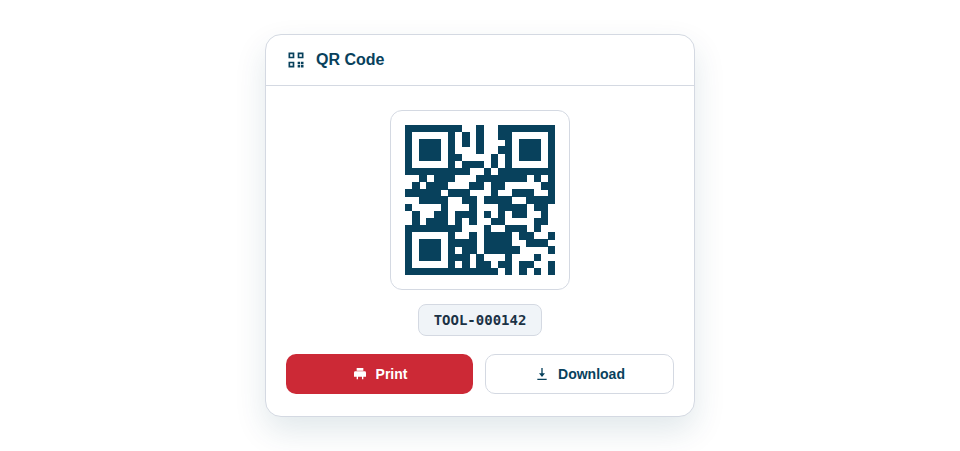
If you would rather label first and catalogue later, Pre-Print QR Codes in Bulk produces a batch of blank codes to stick on now and link to assets by scanning when you get to them; Assign Pre-Printed Stickers covers stickers you already have. The step-by-step guide is Printing QR Code Labels, and Best Practices for Printing Clear, Scannable Labels covers printer settings.
Printing at home, or sending the PDF to a print shop
There is no requirement to print them yourself. The same PDF downloads, so a print shop or an online label printer can run your design onto stock a desktop printer will never feed. Both routes start from the identical file and the identical design, so the choice is only about cost, material and how soon you need them.
| Print it yourself | Send the PDF to a printer | |
|---|---|---|
| Cost | A pack of A4 label sheets, with 21 to 88 labels on every sheet — pennies a label. Durable polyester sheets cost several times paper, and are still cheap per label. | Priced per sheet or per label, usually with a minimum order, so it costs more per label. Setup and delivery are on top. |
| Materials | Whatever your printer will feed: paper, and polyester or vinyl sheets sold for laser or inkjet. | Heavy-duty polyester, laminated stock, metallised and tamper-evident labels, and sizes that do not come on a sheet. |
| How soon | Minutes. Print ten now and another ten when the next delivery lands. | Days, plus the wait for a reprint if you need more. |
| Best for | Getting labelled this week, small batches, adding kit as it arrives. | A large first batch, or plant that lives outdoors and has to stay readable for years. |
For most companies the honest answer is both: print your own to get every item labelled and working now, and order a heavy-duty run later for the handful of items that live outside, get jet-washed or go out on hire. Nothing is lost by starting at home — the QR code on a label is tied to the asset, so replacing a worn paper label with a printed polyester one later changes nothing about the record behind it.
How a scan finds the asset
The tag carries a short web address that is unique to that sticker. When a phone camera reads it, the browser opens the address and Asset Giant looks up which asset the sticker belongs to. What happens next depends on who is scanning:
- A logged-in team member lands straight on the asset record, ready to check it out, move it or update it. The Mobile QR Scanner inside the app does the same from a single screen, scan after scan.
- Anyone else sees the page you have chosen in Settings. By default that is a found-item page showing your company name and logo, with your public phone number, email and a short message if you choose to show them — the way a walked tool comes home. You can instead ask for a login, or on paid plans send the scan to a web address of your own.
- Public codes for customers and marketing point wherever you decide; Public vs. Private QR Codes: What’s the Difference? explains the choice.
Once applied, a sticker is bound to that item’s identity: every future scan reaches the same record. If a label is damaged, generate a fresh one and apply it; the asset, its history and its paperwork carry on unchanged.
Best Practice: Label the kit that moves most first — the drills, the laser levels, the cameras and the cases — and put the company name and a phone number on every label. Those are the items that go missing, and the label is what brings them back.
QR tags, the label designer, the print queue and scanning are all included on the Free Forever Plan. To see how scanning works once your labels are on, see Getting Started with the QR Scanner.