
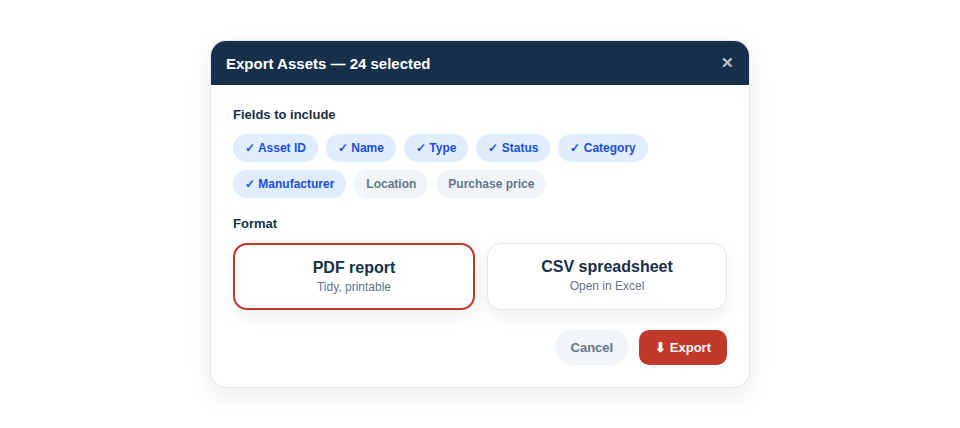
Your data is yours. In a couple of clicks, download your whole inventory — or any filtered selection — as a spreadsheet-ready CSV or a tidy PDF. Whatever you put in, you can always get back out.
Get your data out, your way
The two formats cover the two things people usually need to do with exported data:
- CSV for analysis — open it in Excel or Google Sheets and slice, total and chart it however you like.
- PDF for sharing — a clean, presentable report suitable for a client, an insurer or an audit file.
- Filtered exports for focus — because you can narrow the inventory first, you can export just the items that matter (one location, one category, one job) rather than always dumping everything.
Freedom from lock-in
Beyond the day-to-day convenience, easy export matters for a bigger reason: it’s the proof that you’re never trapped. Knowing you can take your full inventory with you at any time is exactly the reassurance that makes a system safe to commit to for the long term. There’s no leverage held over you, no awkward extraction process, and no sense that your own records are being kept just out of reach.
A typical export takes moments:
- Optionally filter the inventory to the set you want.
- Choose CSV or PDF and the fields to include.
- Download, and use the file wherever you need it.
Best Practice: Take a periodic CSV export and keep it with your business records. It doubles as an offline snapshot of your equipment for insurance, and as simple peace of mind.
Export works in both directions, too: what you can take out, you can bring back in. If your kit list already lives in a spreadsheet, Import From a Spreadsheet brings it straight into Asset Giant — and because our export headings are the ones the importer recognises, an export, an edit in Excel and a re-import line up column for column.
For the full guide, see Exporting a List to PDF or CSV.