
Asset Giant keeps the proof of a repeating job on the asset it was done to. The PAT test, the LOLER thorough examination, the calibration, the annual service: each one carries its date, its result, who carried it out, what it cost and the certificate. Ask when the hoist was last examined and the answer is on the hoist, not in a lever-arch file and not in somebody’s inbox.
You describe each job once — what it is called, how often it comes round, which kinds of asset it applies to — and then add it to the items it covers. From that point the next due date looks after itself, the items coming due show up in your inventory, and a reminder can land in the right inbox weeks before anything lapses.
A library of jobs, written in your own words
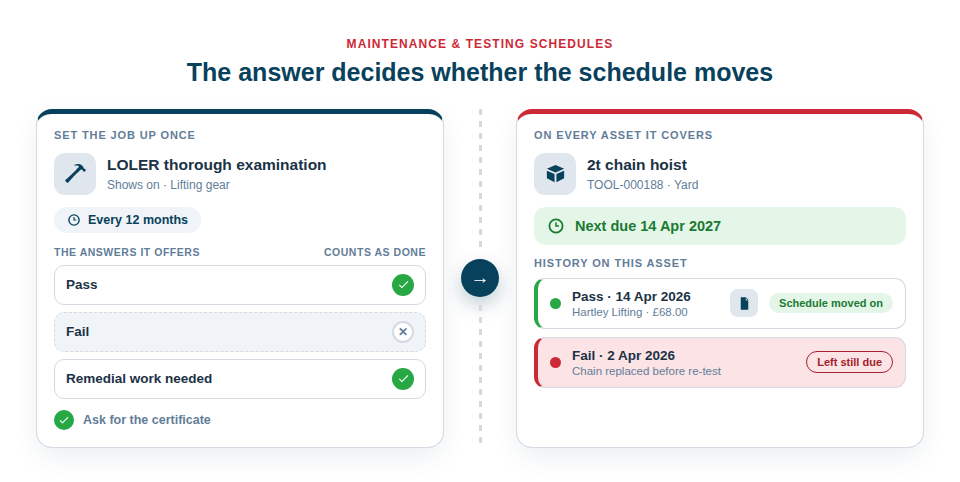
Your jobs live in one place and are reused everywhere. Start with the common UK trade set in one press — PAT test, LOLER thorough examination, Calibration, Service, Oil change, Disc or filter replacement, HAVS check and LEV test, each with a sensible interval — or write your own from scratch. Each job holds:
- Its name, in the words your team already uses on the paperwork.
- How often it comes round — so many days, weeks or months, or so many run hours. One job can leave the interval open and let each asset set its own.
- The answers it offers to “how did it go?” Pass, Fail and Remedial work needed to begin with, and you can rewrite them: an oil change does not pass or fail.
- Which assets it shows on — by asset type, by category, or by both. LOLER on the lifting gear, PAT and calibration on the power tools. Nothing irrelevant is ever offered on an asset that cannot have it.
- Whether to ask for a certificate when it is recorded.
The answer that decides whether the job is finished
Each answer carries a counts as done tick, and that tick is what moves the schedule. Recording Pass sets the next date one interval later. Recording Fail writes the attempt into the history and leaves the job still due — which is precisely what a failed test should do. You decide, per job, which of your own answers settle it and which do not, so “remedial work needed” can mean finished in one company and still outstanding in another.
Count a service in run hours
A generator is serviced every 250 hours it has run, not every six months. Set a job’s interval in run hours and it is counted off the machine’s own hour meter.
Read the meter, type the number and the day you read it, and the asset tells you what the next service is due at — 1,000 hours now, so the next one at 1,250. Record the service and the reading goes into the history beside the date, the cost and the certificate, and the next target moves on by itself.
Two readings a fortnight or more apart are enough for Asset Giant to see how hard the machine is being worked, and from that to put a date on the next service — so an hours-based job still appears in your Due within filter and still has a reminder weeks before it lands. The hours are the target; the date is our best read of when you will reach it, and it is marked that way wherever it appears.
Recording one takes seconds
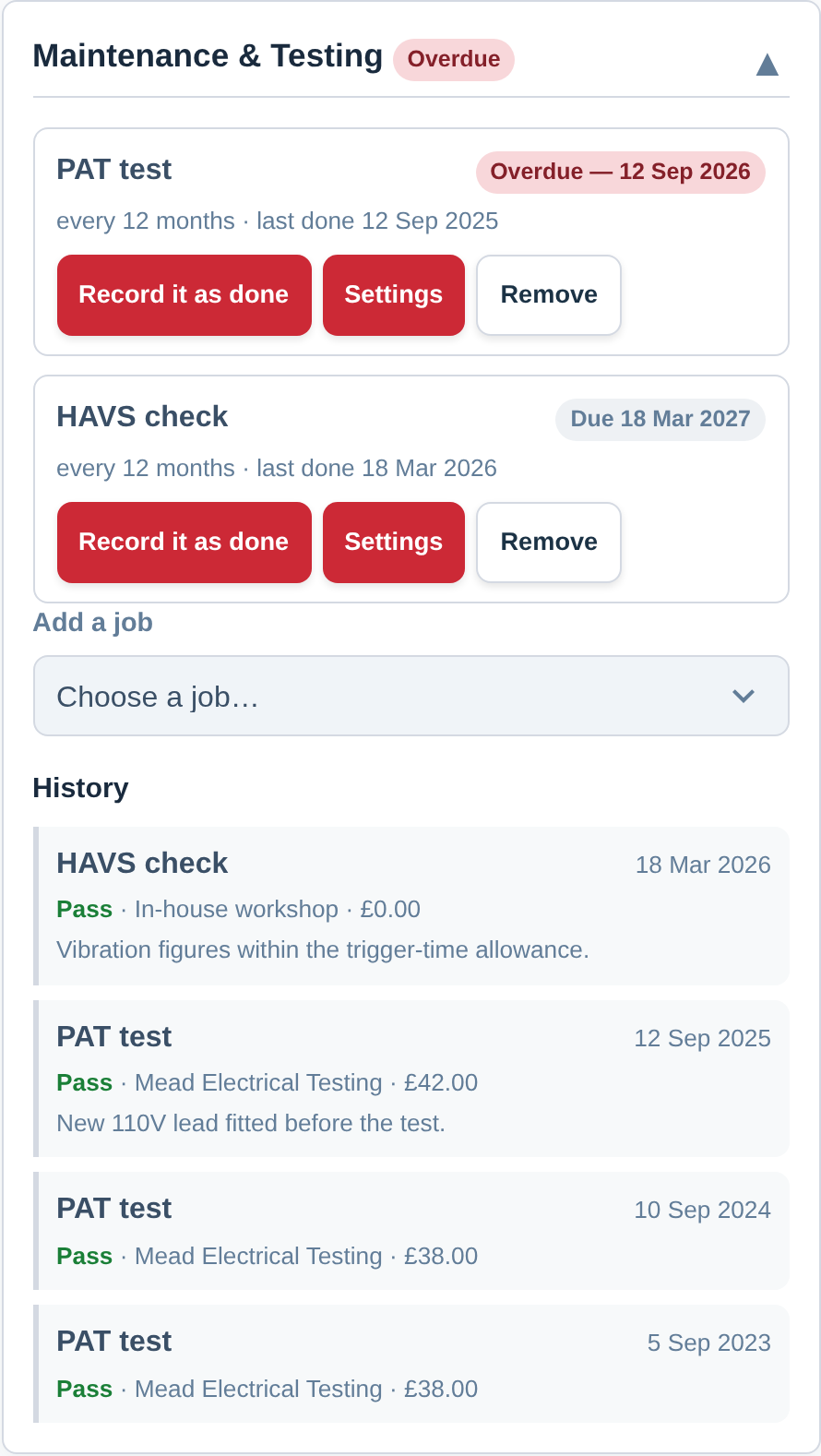
On the asset, press Record it as done and answer a short sheet: when it was done, how it went, who did it, what it cost, the certificate and any notes. The next date is worked out from the date the work actually happened, so a test done three weeks late moves the next one three weeks later instead of quietly keeping a cycle nobody kept.
When a tester has just worked through a yard full of items, tick them in your inventory and use Record maintenance… — one date, one result, one set of details, written against every item at once. Putting a new job onto a few hundred assets is the same idea in reverse: tick them and use Schedule maintenance… (see Edit, Move or Delete Many Assets at Once).
Each asset then shows its own permanent history, newest first — every job ever recorded on it, with the certificate attached to the record. Take a job off an asset and that history stays exactly where it is, because the proof that a test happened should never depend on the schedule still being there.
What is due, in the place you already look
Due dates are not a separate report to go and find. Your inventory’s Due within filter takes Maintenance or testing as a source, so “everything due in the next thirty days” is two taps from the screen you use all day, and the list is ready to hand to whoever books the testing. Three export columns — next due, which job it is, and every job on the item — turn the same thing into a register for a client, an insurer or an auditor (see Export Your Inventory).
A reminder closes the loop: choose Maintenance or testing due, pick one job or Any job, say how many days’ notice you want and who should hear. Thirty days is enough to get a tester booked. Reminders are included from the Crew plan (see Alerts Before a Date Passes).
Bringing your existing register across
If your dates are in a spreadsheet, they can come in as records rather than as text. Set the jobs up first and the import screen offers one column per job — PAT test — last done, LOLER thorough examination — last done — so every item arrives with the schedule on it and its next date already worked out. A blank cell simply leaves that item off that schedule (see Import From a Spreadsheet).
Best Practice: Set up two or three jobs, not ten. Put them on the assets they cover in bulk, import or key in the last-done dates, and add one reminder at thirty days to whoever books the testing. That is a working compliance record inside an afternoon.
For the step-by-step, see Setting Up Maintenance and Test Schedules. For a single date that needs no result or certificate, a date custom field is the lighter answer (see Custom Fields), and for keeping the people side in date, see Training Records & Certificates.