
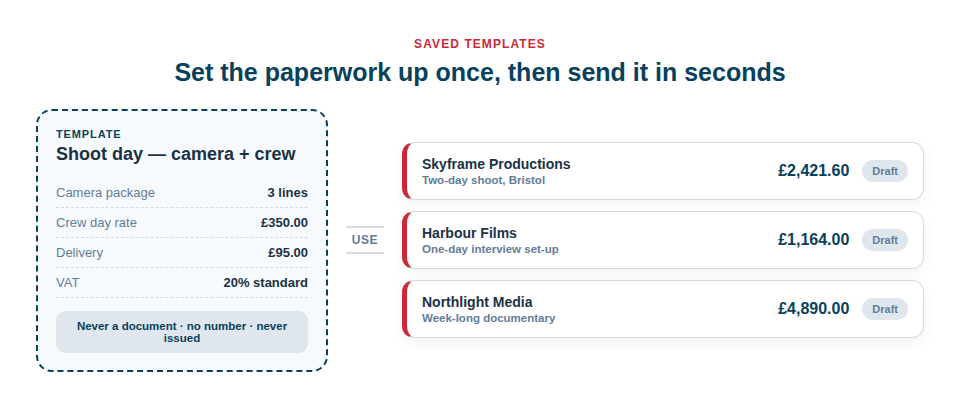
Sending out near-identical paperwork is a real time-waster — the monthly plant hire to the same developer, the standard shoot day, the call-out and delivery that go on the bottom of nearly every job. Same lines, same rates, a different date and a figure or two.
Save one as a template and the next one starts finished. It also stops the quiet losses: the delivery charge that went unbilled, the wrong tax treatment on a zero-rated line, terms that read differently on every document you have ever sent.
What a template actually holds
A template is a blueprint for a quote or an invoice, saved under a name you choose. It can hold everything the document held:
- The line items — hire items from your inventory, saved rate items such as labour grades or delivery, and any free-typed lines, headings, subtotals and notes you had arranged.
- The rates and quantities on each of those lines, so “three crew, two days” comes back as three crew and two days.
- The tax rate on each line, including the zero-rated, exempt and reverse-charge treatments that a mixed job needs.
- Everything in Terms & notes — your payment terms, your hire terms, the note to the client and your own internal note.
- The Details you always fill in the same way — the client, the project, whether tax is charged at all, and how you like the tax shown against each line.
Every single field is optional. A template can be one carefully worded terms paragraph and nothing else, if that is the part you keep retyping. It can be a full twenty-line hire schedule. It can be a bare skeleton of headings that you fill in on site. There is no minimum and nothing you are obliged to set.
What a template is deliberately not
This matters, because it is what keeps the feature safe to use on real paperwork.
A template is not a document. It has no invoice number, no status and no share link. It never appears in your list of quotes and invoices, it never turns up in your tax report or your aged-owing figures, and it is never counted against the invoices allowance on your plan. Nothing about a template is issued, sent or owed.
When you use one, you get an ordinary editable draft — the same draft you would get from any other starting point, with no number on it and the Issue button still waiting for you. You can change every line, add three more, delete two, change the client and change your mind. Nothing is committed until you press Issue, exactly as it always was.
Two ways it earns its keep
The recurring hire invoice
A plant hire firm invoices the same housebuilder at the end of every month: a nine-tonne excavator, two dumpers, a lighting tower, delivery both ways, and a fuel line. Building that by hand on the last Friday of the month is an hour, and one of those months it will go out with a dumper missing.
Saved as “Monthly plant hire — Barratt”, that becomes: open the Templates tab, choose it, set the dates for the month just gone, and read down the draft. The hire lines re-price themselves against your current rates over the dates you have just given, so a rate rise in March is charged from March without anybody having to remember it. Ten minutes becomes one, and the dumper does not go missing.
The standard crew-and-kit quote
A production company quotes shoot days constantly, and they are all variations on the same thing: a camera package, a lighting package, a grip package, an operator, an assistant, a runner, and a delivery to location. The kit changes; the shape never does.
Saved as “Standard shoot day”, the quote goes out the same afternoon the call comes in — headings and subtotals already in the right places, the day rates already correct, the terms paragraph already the one your accountant approved. You strip out what the job does not need rather than trying to remember what it does. The client gets a properly formatted quote while they are still thinking about the job, which is very often the whole reason you get it.
Where dates and prices come from
A template deliberately stores no dates at all. No issue date, no tax point, no due date and no hire window. A blueprint that always dated an invoice last August would be a quiet, long-running mistake; instead, the dates belong to the job in front of you, and the due date is worked out from your own payment terms when you issue.
Hire lines follow from that. Because a hire price depends on both the rate and the window it covers, a hire line in a template carries no frozen price — it is re-priced against today’s rates over the dates you give it. That is what stops a template slowly becoming wrong as your rates move.
The same late-resolution idea applies to your tax rates. A template stores the name of the tax rate on each line, not the percentage, so if your standard rate changes, every document you make from every template charges the new one. And if a tax rate has been renamed or removed from your settings since the template was saved, Asset Giant will not guess: the line arrives with no tax rate and a plain message on the draft telling you which line and which rate to look at — while it is still a draft, before anything has been issued.
Getting started
You do not set a template up from scratch. You build one quote or one invoice the way you actually want it, then press Save as template on it and give it a name. The document you saved it from is not changed in any way.
After that, templates live behind the Templates tab on your Quotes & Invoices screen, where you can rename them, delete the ones you have outgrown, and start a new draft from any of them. + Add New on any documents screen carries a From Template option too, so the shortcut is there at the exact moment you would otherwise be starting from nothing.
For the step-by-step version, see Using Quote and Invoice Templates. If you have not set your rates and tax rates up yet, How to Add and Manage Clients and How to Add and Manage Projects are the records a document is raised against.