
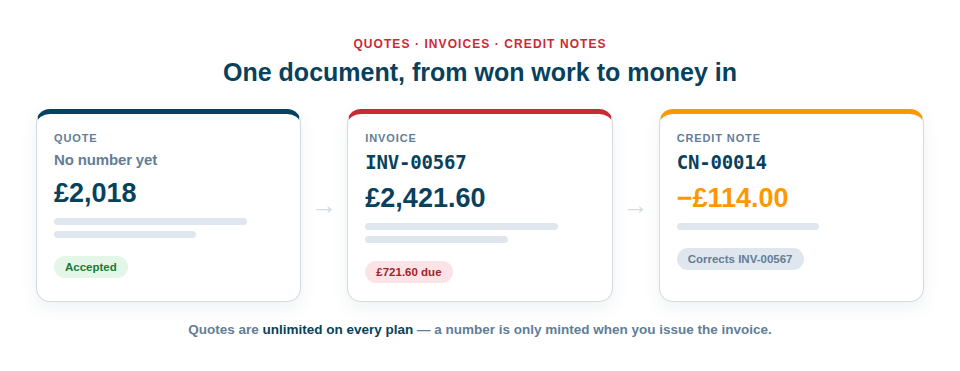
Quotes, invoices and credit notes are built into Asset Giant, raised against the kit, clients and projects you already track. A quote is priced from your own hire and labour rates, and becomes an invoice with one press when the job is won — no retyping, and no second system to buy.
Three documents, one lifecycle
Asset Giant produces quotes, invoices and credit notes. They share a single screen and a single set of rules, so nothing has to be learned twice:
- A quote is a price you are offering. It can be accepted, declined, or left to expire, and it converts into an invoice once.
- An invoice is money owed. It is numbered sequentially, frozen the moment you issue it, and it tracks itself from issued through part paid to paid — going overdue on its own when the due date passes.
- A credit note corrects an invoice that has already gone out. It cites the invoice it relates to on its face, and you can raise more than one against the same invoice for partial credits.
Quotes are unlimited on every plan, including Free Forever. Only issued invoices are counted — five a month on the free plan, unlimited on every paid one. Credit notes are never counted either, so a mistake can always be corrected.
Lay the document out the way you actually bill
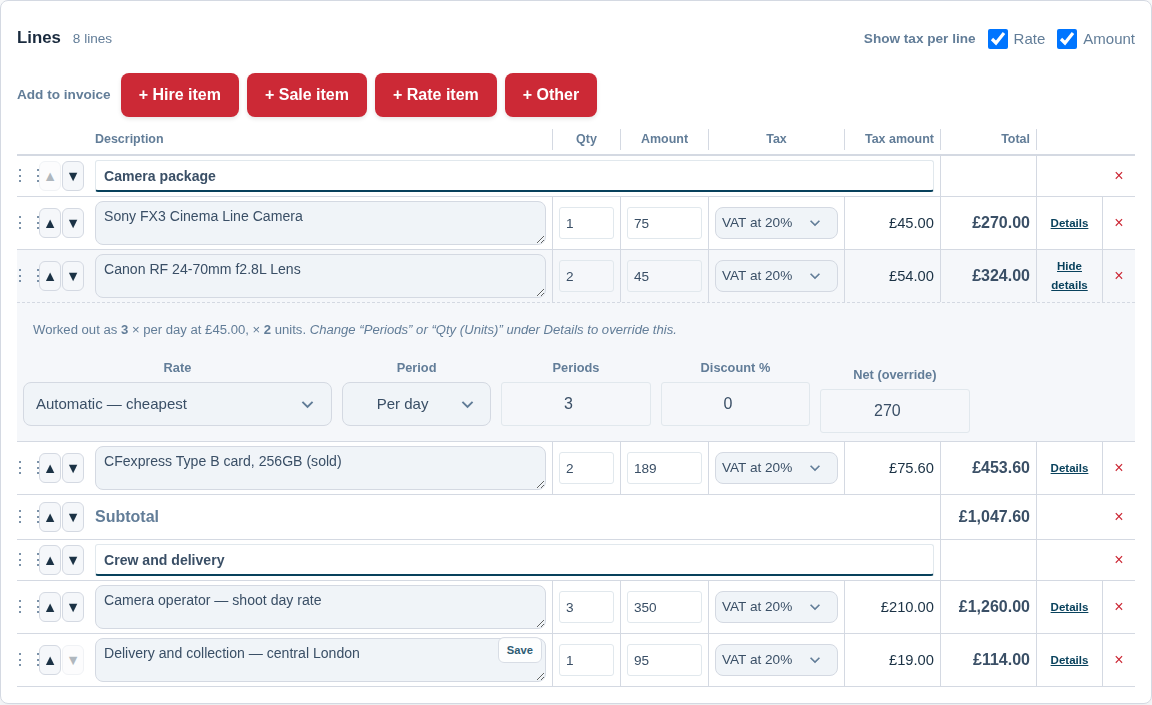
Most billing tools give you a flat list of products. A real quote has a shape — a section for the kit, a section for the crew, a subtotal the client can point at. Every document here is a list of lines you arrange yourself:
- Hire items picked from your own inventory, priced from that asset’s rates over the dates of the job.
- Sale items picked from the same inventory but sold, not hired — no dates, no charge calendar, and the stock comes off the record when the invoice is issued. Hire and sale sit on one document, which most hire systems will not do.
- Rate items from your saved catalogue — a labourer’s day rate, a call-out charge, a delivery, a disposal fee, an operator’s hourly rate. Anything you charge for that is not a physical asset.
- Free-text lines for the one-off charge that fits nowhere else.
- Section headings, so “Plant”, “Labour” and “Materials” are visibly separate.
- Subtotals, placed wherever you want a running figure.
- Notes with no charge attached, for the sentence that saves a phone call.
Drag any line into any position. Every money line carries its own quantity — decimals included, so half a day or 2.5 metres is a line and not a fudge — plus its rate, period and discount percentage, and its own total where the maths needs overriding. A typed line can be saved to your rate catalogue in one click and reused for ever. You also choose what the client sees: the tax rate per line, the tax amount, both or neither.
Tax, done properly
An invoice is a legal record, not a formatted email.
If you are a UK VAT-registered business, everything the rules ask for is here:
- Multiple VAT rates, defined once in your settings and picked per line.
- Zero-rated, exempt and outside-scope treatments kept genuinely separate, because in law they are three different things and an invoice has to say which is which.
- The construction domestic reverse charge, with the Section 55A wording the regulations require and the rate that would have applied shown while nothing is charged.
- Simplified invoices where the value allows, and the required statements added automatically rather than remembered.
- If you are not VAT registered, nothing you send will ever call itself a VAT invoice. That is a gate in the code, not a display preference.
And if you are not in the UK, you are not stuck with ours. You set the name of the tax and you set the rates:
- Name the tax whatever your country calls it — GST, TVA, sales tax — and that word is what appears on the document, in the totals and in the tax report.
- Add as many rates as you need, each with its own label, its own percentage and its own treatment. Nothing here assumes 20%, and nothing assumes there is only one rate.
- UK-specific statute stays in the UK. The Section 55A reverse-charge wording and the simplified-invoice threshold are British rules, so they simply do not appear on a non-UK document rather than being applied to a country they do not belong to.
Either way, sequential numbering with a prefix and a digit count you choose, per document type — and a refused or abandoned issue never burns a number.
Your trading name, registered address, VAT number, company number and logo are set once and snapshotted onto each document as it is issued — so an invoice from March still shows March’s details after you move office.
Getting it to the customer
Every issued document can be downloaded as a PDF, emailed from inside the app with a copy to yourself, or shared as a private link the client can open without an account. Once it has been emailed, a Sent marker appears beside the status so you never have to guess.
On paid plans you can remove Asset Giant branding from the PDF entirely, so what lands in your customer’s inbox is your document and nobody else’s.
Where to go next
If you send the same shape of paperwork over and over, save it once — see Quote and Invoice Templates. If you are billing kit out by the day or the week, the pricing rules behind a hire line are worth ten minutes of your time: Hire Pricing and Charges. And when it comes to being paid, Getting Paid and Tracking What You Are Owed covers card payments, the payments ledger and the aged-owing view.
For the step-by-step version, read Creating Quotes and Invoices.