
Every business tracks different kinds of asset. Asset types let you define those top-level classes yourself, each with its own ID format, so your references read naturally from day one and the AI’s suggestions get sharper.

Make the system speak your language
Setting up your own types brings the structure of the software into line with the structure of your business:
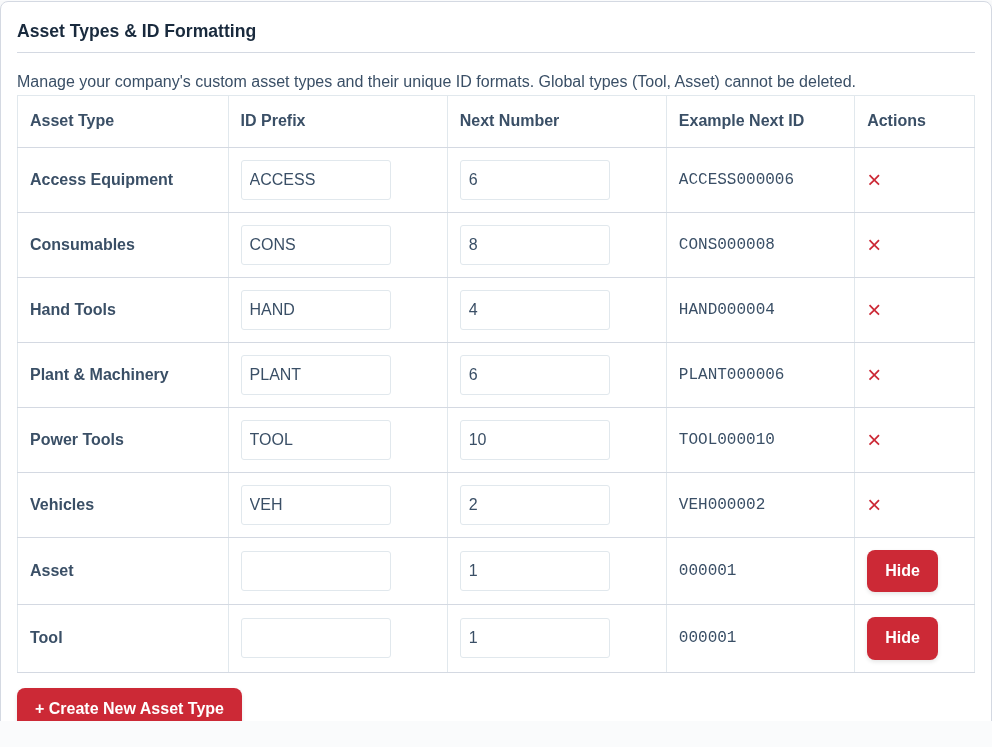
- Your own types — create the kinds of asset you actually own, and hide the ones you don’t.
- Per-type ID formats — tools become TOOL000001, plant becomes PLANT000001, vehicles become VEH000001, so a reference tells you at a glance what sort of thing it points to.
- Sharper AI — because the type is part of the context, the AI leans towards sensible categories and details for that kind of item.
Tidy from the very first asset
The value of getting your types right early is that every asset you add afterwards slots into a clear, consistent structure automatically. There’s no retro-fitting and no clean-up, because the framework was in place before the data went in. New staff inherit that structure too, adding items into the same well-defined types rather than inventing their own.
A sensible setup sequence is:
- Decide on the handful of top-level types your business genuinely needs.
- Give each one an ID prefix that reads naturally.
- Add assets as usual; each is automatically stamped with the right type and ID.
Best Practice: Keep types high-level and few. The fine detail of what something is belongs in categories; asset types are for the broad classes — tools, plant, vehicles, consumables — that deserve their own ID series.
For more, see Set Up Asset Types for the Kit You Track and Change the Prefix and Numbering on Your Asset IDs.