
Everyone you invite to your company is given a role. The role decides what that person can do once they are signed in — and, just as importantly, what they can’t.
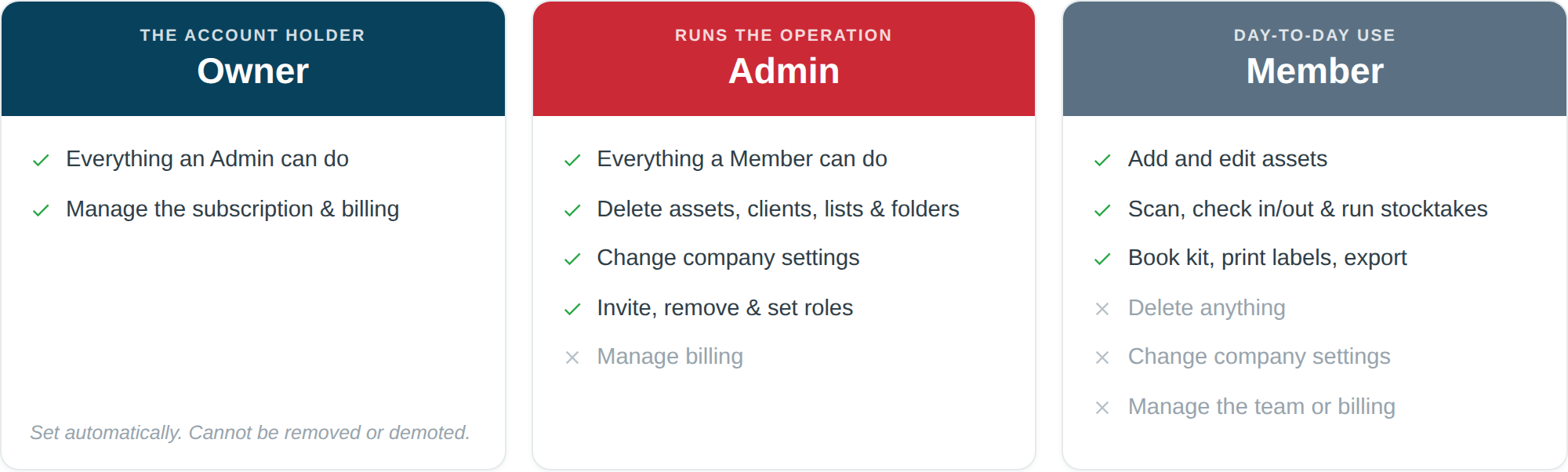
The point of roles is simple: you want the whole crew recording what they do with the kit, without every one of them being able to reshape your setup or delete records. Roles let you hand out access widely and still sleep at night.
The five roles
They run from most to least access: Owner, Admin, Member, Scanner, Viewer. Most companies only ever need two of them — Admin for whoever runs the operation, Member for everyone else — but the other two exist for the two cases that come up again and again on site: the labourer who only ever scans, and the client or subcontractor who needs to see the kit and touch nothing.
Member
This is the everyday role, and the right one for most of your team.
A Member can:
- Add, edit and view assets.
- Change an asset’s status — flagging a fault, marking something as needing repair.
- Use the mobile scanner to check kit in and out and to run stocktakes.
- Create and manage folders, lists, clients, projects and locations.
- Book assets on the calendar.
- Print QR labels and export data.
- Use the AI lookup and the dashboard assistant.
A Member cannot:
- Delete assets, clients, projects, locations, lists or folders.
- Change company-wide settings — company profile, preferences, the asset ID format, custom fields, categories, asset types, AI settings or QR settings.
- Invite, remove or change the role of anyone on the team.
- See or change the subscription.
In short: a Member can do all the day-to-day work, but can’t undo it or reconfigure the system around it.
Scanner
The role for a labourer, an apprentice on their first week, or a subcontractor who is on site for a fortnight. A Scanner is there to record what happens to the kit, and nothing else.
A Scanner can:
- See the inventory.
- Scan a QR code to find out what something is and where it should be.
- Check kit in and out.
- Run a stocktake.
- Assign a QR sticker to an asset.
- Change an asset’s status — flagging a fault or damage.
A Scanner cannot:
- Add or edit assets.
- Delete anything.
- Create or change locations, projects, clients or lists.
- Book kit on the calendar.
- Export data or print labels.
- Touch any company setting.
This is the role to hand out freely. Someone who has been on site three days can be given a phone and a Scanner login with no training and no risk — the worst they can do is check something in to the wrong van, which is a two-tap fix.
Viewer
Completely read-only. A Viewer can see the inventory and nothing else — no adding, no editing, no scanning actions, no exporting.
Use it for a client who wants to see what’s on their job, an insurer, an accountant, or a subcontractor who needs visibility without access. It is the safest role in the system: there is no action a Viewer can take that changes a single record.
Admin
An Admin can do everything a Member can do, plus:
- Delete records.
- Change any company-wide setting.
- Invite new people, remove people, and change other people’s roles.
- View the subscription and usage.
This is the role for the people actually running the operation — an owner, a manager, an office administrator.
Owner
The Owner is the person who created the company account. There is exactly one, and it is set automatically — you don’t assign it.
An Owner can do everything an Admin can do, plus manage billing. The Owner is also protected: they can’t be removed from the company, and their role can’t be changed by anyone else. That’s deliberate — it stops an account being left with nobody in charge of it.
Which role should I give someone?
| If they… | Give them |
|---|---|
| Only scan kit in and out, run stocktakes, flag faults | Scanner |
| Move, scan, add and update kit on site | Member |
| Run the office, manage the setup, look after the team | Admin |
| Need to see the kit but change nothing | Viewer |
| Signed up for the account | Owner (automatic) |
Our advice: keep the number of Admins small — the owner and perhaps one or two trusted managers — and make everyone else a Member or a Scanner. It costs you nothing to promote someone later if their responsibilities grow, and a new starter who begins as a Scanner and moves up to Member after a month is a perfectly normal path.
The full picture
| Viewer | Scanner | Member | Admin | Owner | |
|---|---|---|---|---|---|
| See the inventory | ✓ | ✓ | ✓ | ✓ | ✓ |
| Scan, check in/out, stocktake | ✗ | ✓ | ✓ | ✓ | ✓ |
| Change an asset’s status | ✗ | ✓ | ✓ | ✓ | ✓ |
| Assign a QR sticker | ✗ | ✓ | ✓ | ✓ | ✓ |
| Add and edit assets | ✗ | ✗ | ✓ | ✓ | ✓ |
| Locations, projects, clients, lists | ✗ | ✗ | ✓ | ✓ | ✓ |
| Book kit on the calendar | ✗ | ✗ | ✓ | ✓ | ✓ |
| Export data, print labels | ✗ | ✗ | ✓ | ✓ | ✓ |
| AI photo lookup | ✗ | ✗ | ✓ | ✓ | ✓ |
| AI dashboard assistant | ✗ | ✗ | ✓ | ✓ | ✓ |
| Delete records | ✗ | ✗ | ✗ | ✓ | ✓ |
| Company settings (including AI settings) | ✗ | ✗ | ✗ | ✓ | ✓ |
| Manage the team | ✗ | ✗ | ✗ | ✓ | ✓ |
| Billing | ✗ | ✗ | ✗ | ✗ | ✓ |
What the AI features can do, and who gets them
Asset Giant has two AI features, and both sit at Member level and above. A Scanner or a Viewer has neither.
- AI photo lookup — point the camera at a tool, and Asset Giant reads the make, model and serial from the photo and fills the form in for you. Members, Admins and Owners can use it.
- The dashboard assistant — the chat box on your dashboard that answers questions about your own kit (“what’s out on the Riverside job?”, “which drills are due a PAT test?”). Same three roles.
Two things worth understanding before you hand AI access out:
- AI lookups come out of a shared company allowance, not a personal one. Every lookup any of your team runs draws down the same pool of credits on your plan. That is the main reason the Scanner role has no AI access — someone scanning kit in and out all day has no need for it, and giving it to them would spend your allowance.
- Only an Admin or Owner can change the AI settings, because they are a company-wide setting like any other. A Member can use AI; they can’t reconfigure it or affect what it does for everyone else.
If someone needs AI lookup, they need to be a Member. There is no way to give a Scanner AI access on its own — the roles are fixed presets, not a pick-and-mix.
Two safety rules worth knowing
Asset Giant will stop you locking yourself out of your own account:
- You can’t demote or remove the Owner.
- You can’t leave the company with nobody who is able to manage the team. In practice this rule almost never gets in your way, because the Owner always counts — so a two-person company of an Owner plus a Member, a Scanner or a Viewer is perfectly fine, and you can change or remove that second person freely. It only bites in the unusual case of a company with no Owner in it, where the last Admin is the safety net and has to be replaced before they can be demoted or removed.
You do not need a separate Admin. If you are the Owner, you already have every permission an Admin has and then some. Add an Admin when you genuinely want to share the running of the account with someone else — not because the system demands one.
What a restricted role sees
If you’re signed in as a Member, you’ll notice that the company settings tabs simply aren’t there, and Delete buttons don’t appear on records. A Scanner won’t see Add Asset or Print Queue in the menu at all, and a Viewer sees the inventory with no bulk actions on it.
That’s not a fault — it’s your role. Controls you can’t use are hidden rather than shown-and-broken, so there’s nothing to click that fails. If you need to do something you can’t, ask an Admin at your company to either do it for you or change your role.
One thing worth saying plainly: this is enforced on our servers, not just in the app. Hiding a button is a courtesy; the refusal happens when the request arrives, so there is no way round it.
For how to invite people and change roles, see Managing Your Team Members and Roles. To invite your first colleague, see Inviting Your First Team Member.