
The “Subscription” tab provides a detailed overview of your current plan and how close you are to its limits. This page is only visible to users with the “Company Admin” role.
The Plans at a Glance
Asset Giant has five plans. Every paid plan is one flat price that already includes access for a set number of team members — the price does not change as your team grows into the seats your plan includes. If you need more people than your plan covers, you add extra users one at a time rather than moving everybody up a tier.
| Plan | Price | Assets | Team members | AI lookups / month | Storage |
|---|---|---|---|---|---|
| Free Forever | Free | 100 | 1 | 25 | 50 MB |
| Crew | £19/mo (or £180/yr) | 500 | 3 | 500 | 500 MB |
| Business | £79/mo (or £750/yr) | 5,000 | 10 | 5,000 | 5 GB |
| Growth | £149/mo (or £1,410/yr) | 20,000 | 25 | 7,500 | 25 GB |
| Enterprise | Contact sales | Unlimited | Unlimited | Unlimited | Unlimited |
Need one or two more people than your plan includes? Extra users are £9 each a month, or £85 each a year, on any paid plan — added to the same bill, on the same date.
A few things worth knowing:
- Free Forever is genuinely free, forever — no card required and no trial clock. It is a great way to try Asset Giant on a small inventory.
- Annual billing saves you money — paying yearly works out cheaper than twelve monthly payments, and you can switch between monthly and annual at any time.
- There is currently no student or promotional discount. The Free Forever plan is the best way to get started at no cost.
- Need more, or a custom arrangement? The Enterprise plan removes the limits — get in touch via the contact page and we will tailor it to you.
Prices and limits shown here are correct at the time of writing; the live pricing page always shows the current figures. For exactly what happens if you reach a limit, see What Happens When You Reach Your Asset Limit.
Your Billing Panel
At the top of the Subscription tab, the Billing panel answers the three questions people actually open this page for:
- Plan — which plan you are on, and whether you pay monthly or yearly.
- Users — how many users you have in total, how many of them your plan includes, and how many are extra seats you have added.
- Next payment — the exact amount and the date it will be taken.
Extra seats are part of that one payment. There is never a second subscription, a second date or a separate charge for a seat, and your invoice shows the number of users it covers.
How to Access the Subscription Page
- Navigate to Settings from the main menu.
- Click on the “Subscription” tab.
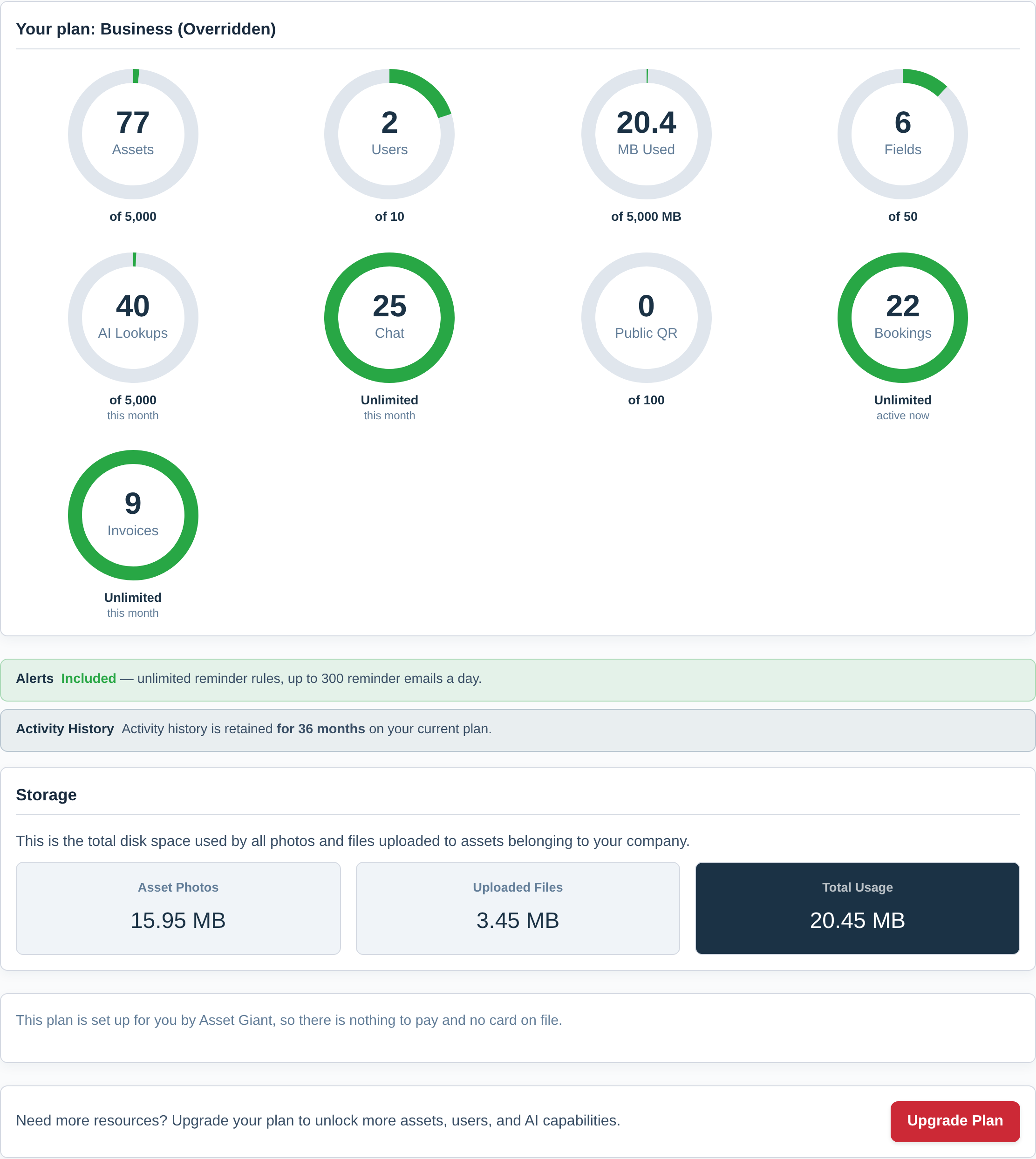
Your Plan Usage Meters
Each dial shows what you have used, with your plan’s allowance underneath it. The ring turns amber as you pass three quarters of an allowance and red as you approach it, so a glance tells you whether anything needs your attention. Where your plan has no limit on something, the ring is a full green circle showing how much you are using, with Unlimited underneath it.
- Assets: The total number of tools and assets you have logged in your inventory. This is the primary limit for most plans.
- Users: The number of team members you have invited to your company account.
- Storage: The total amount of disk space used by all the photos and files you have uploaded.
- Custom Fields: The number of unique custom fields you have created for your company.
- AI Lookups: How many times you have used the AI identification features this month. This counter resets monthly.
- Chatbot Messages: How many messages you have sent to the AI assistant this month. This counter also resets monthly.
- Public QR Codes: The number of QR codes you have set up to show information publicly when scanned by someone who is not logged in.
- Bookings: How many bookings are active right now.
- Invoices: How many invoices you have issued this month. This counter resets monthly.
Below the dials, three short panels fill in the detail:
- Alerts — whether reminders are part of your plan, how many reminder rules you can set up, and how many reminder emails a day they can send.
- Activity History — how far back your activity log goes on your plan.
- Storage — the same figure as the Storage dial, split into asset photos and uploaded files, so you can see which is using the space.
Managing Billing and Upgrades
- Manage Billing: This button will take you to your secure customer portal, powered by our payment processor, SureCart. Here you can update your payment method, view invoices, and manage your subscription details.
- Upgrade Plan: If you are nearing your limits, this button will take you to the public pricing page where you can choose a plan with more resources.
- Add a user seat: If you only need one or two more people, add extra users here or on the Team Management tab instead of changing plan. The confirmation shows what you pay now — only the days left in the current period — and what your bill becomes afterwards. Your renewal date does not move. Once you need a lot of extra seats the next plan up is better value, and the screen says so.