
Almost nobody charges days × rate. There are rate bands and the customer expects the cheapest to apply; weekends may not be billable; there is a minimum charge on small items, grace on a late return, and a trade price for the accounts that earn it.
Asset Giant prices a hire against your rules, not a formula — and shows the working on the line, so you can see how a figure was reached and overrule it when the job needs it.
Three rates per item, and the cheapest one wins
Every asset can carry up to three rates, each with its own period — hour, day, week, month, or a single fixed charge:
- Rate 1 is your standard customer price.
- Rate 2 is your trade price.
- Rate 3 is your contract price.
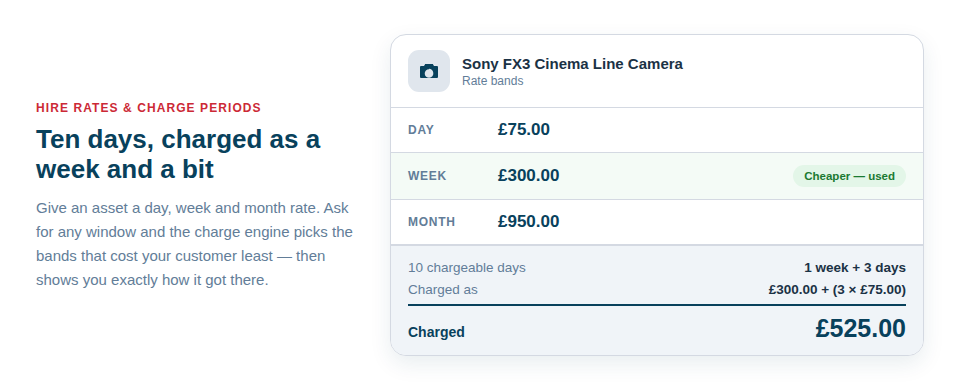
Each band sets its own period, so an excavator can be £120 a day on the standard band and £480 a week on the next one. When you add it to a quote, Asset Giant prices every band it has over the dates you gave and charges the one that produces the lowest total. On an item at £30 a day and £150 a week, a twelve-day hire comes out at £300 rather than £360, without anyone having to remember to check. If a customer is on your trade or contract terms, pick that band yourself and it is used regardless.
Leave the rates blank on anything you never hire out. An item with no rate simply never appears as a priced hire line.
The charge calendar — the setting that changes everything
Set once, in Settings under Hire and Invoicing, and applied to every hire line afterwards:
- Chargeable days. Tick the days you actually bill for. A hire yard usually ticks all seven; a building firm ticks Monday to Friday, which turns a Friday-to-Monday loan into one chargeable day instead of three. This single setting is the difference between an invoice your customer accepts and an argument.
- Week length. How many charge days make a week, so a weekly rate converts correctly on a five-day week.
- Part periods. What happens to the remainder: round up to a whole period, round up to the nearest half, or charge strictly in proportion.
- Minimum hire. A floor in days, below which nothing is charged less than.
- Grace hours on return. The tolerance you already give people in practice, made explicit, so a van back at nine in the morning does not silently become another day.
Alongside the calendar, each asset can carry its own minimum charge — the floor beneath which that particular item is never billed, however short the hire — and a security deposit figure.
It shows the working
The most useful thing about the pricing engine is that it does not hide. Open the Details panel on any hire line and you get the rate it priced from, the period, the number of periods it calculated, and any discount, in plain words: worked out as three days at £120, less ten per cent. The number of periods is a field you can type over, and the line total can be overridden outright when a job genuinely needs a different figure.
That matters because a quote is a negotiation. You should be able to knock a day off, apply a discount to one line and not another, or agree a flat price for the week — without abandoning the system and going back to a spreadsheet.

What this looks like on a real job
A groundworks contractor — a dumper and a whacker plate out Thursday, back the following Wednesday:
- The weekend is not billed, because chargeable days are set to Monday–Friday.
- The dumper’s weekly rate beats its day rate over that window, so it is charged as a week.
- The whacker plate’s does not, so it stays on the day rate. Same job, two different bands.
- Plant sits under one heading and the operator’s day rate under another, with a subtotal beneath each.
- It goes out as a quote before the digger has left the yard.
A production company — a camera package, two lights and a grip trolley on a three-day shoot:
- Kit under one heading at day rates; crew under another as saved rate items.
- Delivery to location goes on as a fixed charge.
- The client sees a subtotal for kit and a subtotal for crew, not one lump.
- The shoot overruns by an afternoon and the grace hours absorb it, rather than adding a day nobody agreed to.
Nothing gets forgotten
Bookings that have ended and not yet been billed collect in an uninvoiced list, so the job that went out three weeks ago and came back quietly does not go unbilled. Bookings you made for your own work rather than for a customer are kept out of it, because telling somebody to invoice themselves is nonsense — and the ones that are filtered out are counted and named rather than silently dropped.
Where to go next
Set your rates up first, then read Pricing a Hire for the step-by-step. The document itself — sections, subtotals, tax and the outputs — is covered in Quotes and Invoices, and if you hire the same kit to the same customer every month, save the paperwork once with Quote and Invoice Templates. Bookings feed all of this: see The Asset Booking Calendar.