
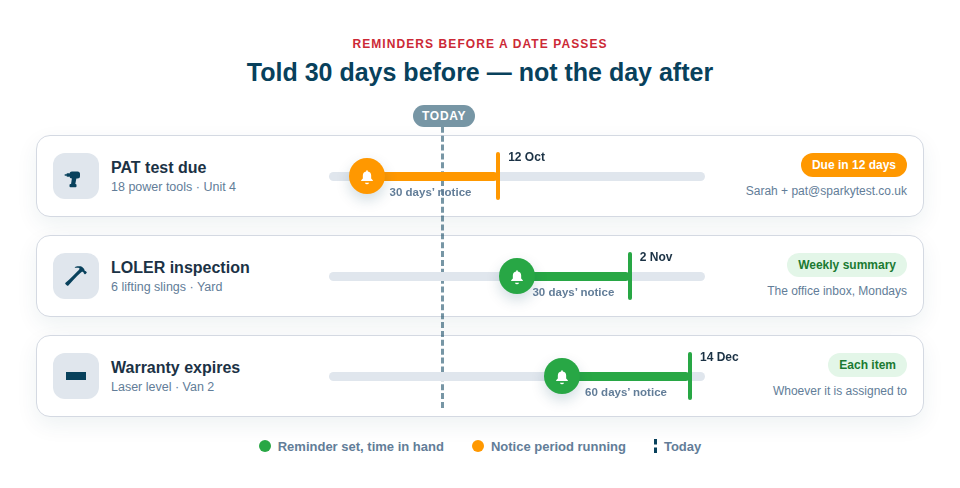
Asset Giant tells the right people before a date on your kit passes — a PAT test due, a LOLER inspection, a warranty running out, a booking due back. You set the reminder once, say how many days’ notice you want and who should hear about it, and from then on it runs by itself: an email arrives listing the items and their dates while there is still time to book the test, make the claim or chase the return.
Reminders are included from the Crew plan. On Free Forever every date is still recorded, searchable and filterable by what is due soon; moving to Crew switches the reminders on.
What a reminder can watch
Reminders work from dates that are already on your assets, so there is nothing extra to key in:
- Any date field you track — PAT test due, LOLER inspection, calibration, MOT, insurance renewal, next service. Add the date as a custom field and it can be watched straight away (see Custom Fields).
- Warranty expiry — the warranty date on each asset’s purchase record, so a claim goes in while the cover still stands (see Financial & Purchase Records).
- Bookings due back and checked-out items due back — the day before, or the same morning, to whoever booked the item or whoever has it.
- Stock below its reorder level — for consumables with a minimum quantity set (see Track Quantities & Consumables).
Dates that come round again — a PAT test every twelve months, a LOLER inspection every six, a ladder check every two weeks — can be set to repeat, every so many days, weeks or months. When the work is done, press Mark as done today on the reminder and the next date rolls forward on its own, counted from the date it was due.
A reminder is one plain rule
Each reminder answers six questions, and the form asks them in order:
- What — which date it watches: a date field, warranty expiry, a booking or a check-out due back, or stock running low.
- Which items — every item, or only some. Filter by asset type, category, folder, location or status, or hand-pick particular items. “PAT due on power tools” and “PAT due on everything” can be two separate rules that go to different people.
- When — how many days’ notice you want, from 0 (only once it is overdue) up to a year ahead. Thirty days is the usual starting point.
- Who — people on your team, the person each item is assigned to, and up to ten outside addresses such as your testing contractor or the office inbox. An outside address is asked once to confirm before it receives anything.
- Each item, or a summary — an email for each item as it comes due, or one daily or weekly round-up at a time you choose. A summary suits a busy rule: forty PAT tests due next month arrive as one list, not forty emails.
- Your own line — a short note at the top of every email from that rule: “Book PAT testing through Sarah, ext 214” or “Send warranty claims to accounts”.
You also choose whether each email carries just the essentials (name, date, location) or every field on the item, and whether the rule’s items show in the app as well as by email. Your company logo can sit at the top of every reminder email.
If you would rather not start from a blank form, the Alerts tab in Settings offers three one-tap starters — warranties expiring 30 days ahead, every date you track, and bookings due back the day before — and you can change who is told afterwards.
Where reminders show up
- By email — to the people the rule names, per item or as a summary. Anyone can switch their own reminder emails off in their Personal Profile without affecting anyone else.
- In the app — a count in the menu, an Alerts page that lists everything needing attention with the most urgent first, and an Attention needed panel on the dashboard. Each row opens the asset, and a repeating date can be marked done on the spot. Read a reminder and mark it as seen: it moves to its own tab and stops counting for you, without hiding anything from anyone else.
- On a phone — the Alerts page and the emails are laid out for a handset, so the person on site sees the same list as the office.
From a spreadsheet to a reminder system
If your test dates live in a spreadsheet today, import it. A column of PAT dates becomes a date field on every asset (see Import From a Spreadsheet), and one reminder on that field covers the lot. Items you add later are picked up by the same rule automatically, so the list never needs maintaining by hand.
The same dates also power the Due within filter in your inventory, which lists everything due in the next week, month or quarter — useful for planning a testing round, and available on every plan.
Best Practice: Start with one rule and a generous lead time — thirty days before, to yourself — and add narrower rules once you can see what arrives. A summary rule to the office plus a per-item rule to the person responsible covers most trades without anyone being emailed twice.
Included from the Crew plan
Reminders are part of the Crew plan and every plan above it. Plan detail is in Simple, Scalable Plans; to add the dates a reminder can watch, see Add Your Own Fields to Track Anything Extra.