
The Inventory Viewer is designed to be easy to use whether you are in the office or on-site. To achieve this, it automatically switches between two different layouts based on your screen size.
Desktop Table View
When viewed on a desktop computer, laptop, or larger tablet, your inventory is displayed in a familiar table format.
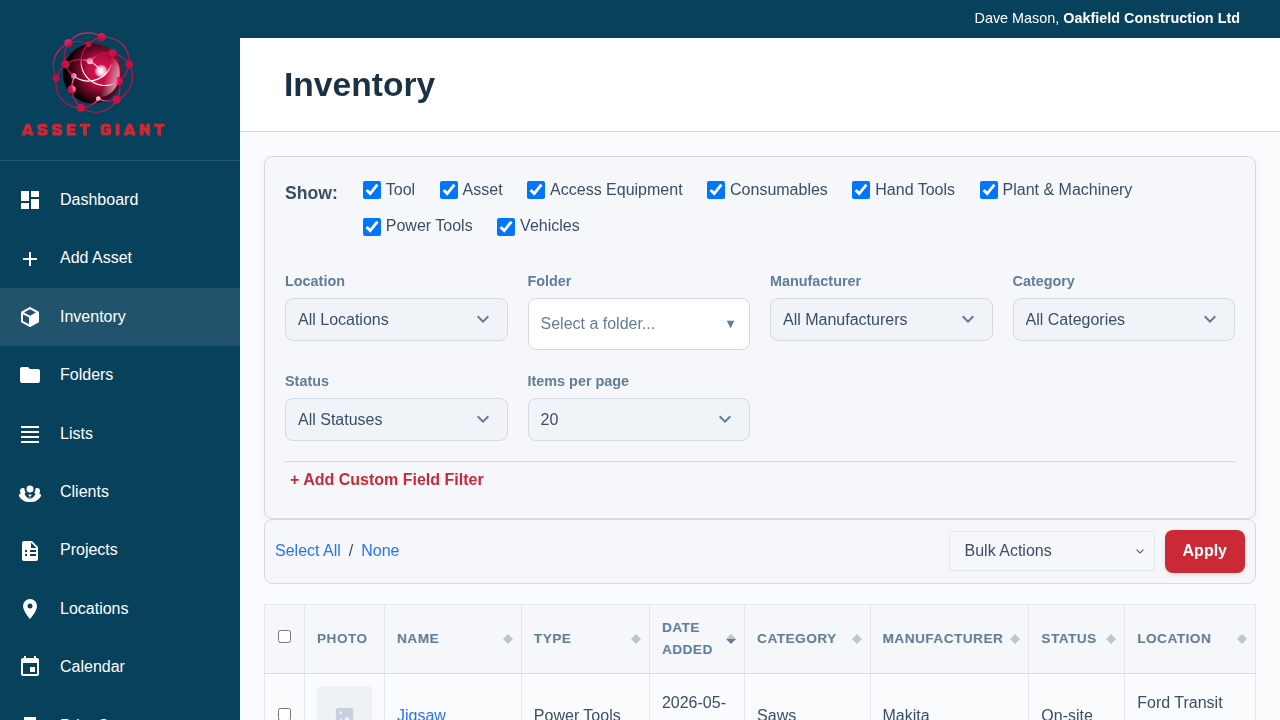
- Best For: Getting a comprehensive overview, comparing many assets at once, and performing detailed sorting and filtering.
- Features:
- Displays many columns of data (Name, Type, Category, Status, etc.).
- Allows you to sort the data by clicking on any sortable column header.
- Optimized for a mouse and keyboard.
Mobile Card View
When you access the inventory on a mobile phone, the layout automatically switches to a more touch-friendly “card” view.

- Best For: Quickly viewing key information on the go, finding an item in the field, and performing simple bulk actions.
- Features:
- Each asset is shown on its own “card” with a photo and the most important details (Name, Status, Location).
- The layout is vertical and optimized for scrolling with your thumb.
- The clickable sort headers are hidden here, so the cards follow whichever sort is currently applied. By default that’s Date Added, newest first, which keeps your most recently added items at the top.
The system switches between these views automatically. There are no settings to change; simply use the device that’s best for your current task, and the interface will adapt.