
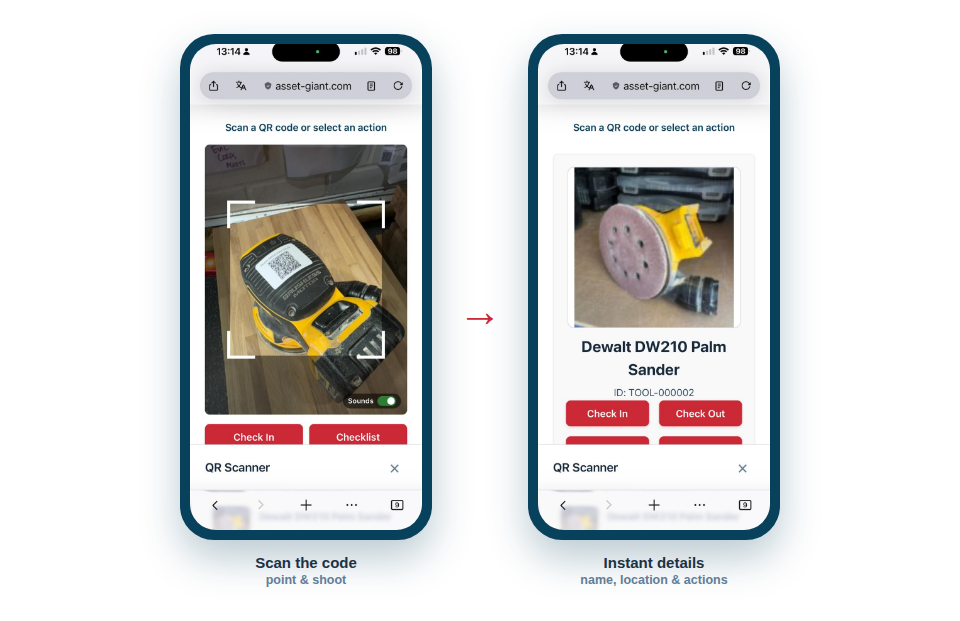
Point your phone at an asset’s code and instantly see what it is, where it belongs and what to do next — settling the on-site “what is this?” shrug on the spot, by whoever’s holding the tool.
Answers in a single scan
A scan does more than name the item; it gives you the context to act:
- Identify any item instantly from its sticker, with no typing or searching.
- See where it belongs — its home location and the person or job it’s assigned to.
- Act straight away with quick actions to check it in, edit its details, or look back through its history.
A small feature that prevents big losses
The value here is in the everyday friction it removes. A stray tool on site gets returned to the right place because anyone can find out where that is in two seconds. An unfamiliar item gets identified without bothering the office. And because acting on what you find is just as quick as looking it up, the right thing actually gets done in the moment rather than left for later.
It fits naturally into how people already move around a job:
- Come across an item you need to identify or put away.
- Scan its code.
- Read the summary, and tap a quick action if you need to update it.
Best Practice: Encourage the habit of “scan it before you move it”. A two-second lookup before relocating a tool keeps the system honest and saves the time everyone otherwise spends hunting for misplaced kit.