

Start Your Free Plan & Simplify Your Paperwork
The Post-Job Paperwork Nightmare
The event was a huge success, but now comes the part every production manager dreads: the paperwork. The client's finance department needs a detailed list of every piece of equipment used for accurate billing. Your accountant needs an end-of-year depreciation report. And you still haven't filed the insurance claim for that damaged lighting fixture from three months ago because you can't find the serial number.
This administrative drag is more than just annoying. It's a major operational bottleneck that:
- Delays Your Payments: The longer it takes you to produce an accurate equipment list, the longer it takes for the client's invoice to get paid.
- Costs You Admin Hours: You or your staff waste hours digging through spreadsheets, emails, and paper notes to manually compile reports.
- Weakens Insurance Claims: Without a detailed, timestamped record of an asset's history and value, you risk having your insurance claims denied or reduced.
- Makes Financial Planning Impossible: You can't make smart decisions about future equipment purchases if you don't have a clear, accurate picture of your current asset values.
The Asset Giant Fix: One-Click Reporting for Everything
Because Asset Giant tracks every piece of gear throughout its entire lifecycle—from purchase to disposal—it can generate powerful, accurate reports for you in seconds.
Here's how you can reclaim your administrative time:
- Link Gear to Projects: As you prep for a job, you link all the relevant assets to a 'Project' in the app. This creates an automatic record of what was used, where, and when.
- Filter and Find: Need to see everything that went to the "Corporate Gala" job last month? Simply filter your asset list by that project. Need a list of all your cameras? Filter by the 'Camera' category.
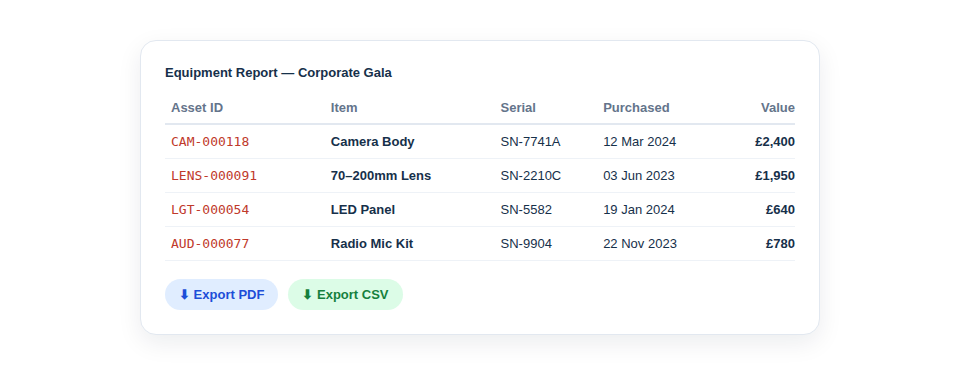
- Click 'Export': Once you have the list you need, just hit the 'Export' button.
- Choose Your Format: Download a professional-looking PDF to send directly to your client, or a flexible CSV file to open in Excel or Google Sheets for your financial planning and accounting.
The Bottom-Line Benefits
- Get Paid Faster: Provide clients with instant, accurate equipment lists, removing any barriers to quick invoice payment.
- Slash Admin Time: Reduce the time spent on post-job paperwork from hours to minutes.
- Ace Your Audits: Generate comprehensive asset depreciation and value reports for your accountant in a single click.
- Strengthen Insurance Claims: Provide insurers with a complete, detailed history of any lost or damaged item, including its serial number, purchase date, and value.
Powerful Reporting is the Final Piece of the Puzzle
From the moment you log a tool with an AI photo scan to the final click of an export button, Asset Giant creates a seamless, end-to-end management workflow. It saves you time at every stage.
[help_link slug="exporting-data-and-creating-reports"]
See the full workflow for Media & Events crews here
Ready to Eliminate Your Paperwork Headaches?
Stop drowning in spreadsheets. Start generating the reports you need with the click of a button. The Asset Giant Solo Trader plan is the perfect way to experience this efficiency boost. It's free forever for one user and up to 50 assets.
