

The office and the site want different things from the same inventory. At a desk, with a big screen and a mouse, you want density — a proper table you can scan down, sort by column and work through in bulk. On a phone, with one hand free and a tool in the other, that same table is a pinch-and-zoom nightmare; what you want there is big, tappable cards showing a photo and the essentials. A system that only does one of these forces half your team to fight the interface.
Asset Giant gives you both, and switches between them automatically to suit the screen. The data is identical — it’s the same live inventory either way — but it’s presented in the form that’s actually usable on the device in front of you.
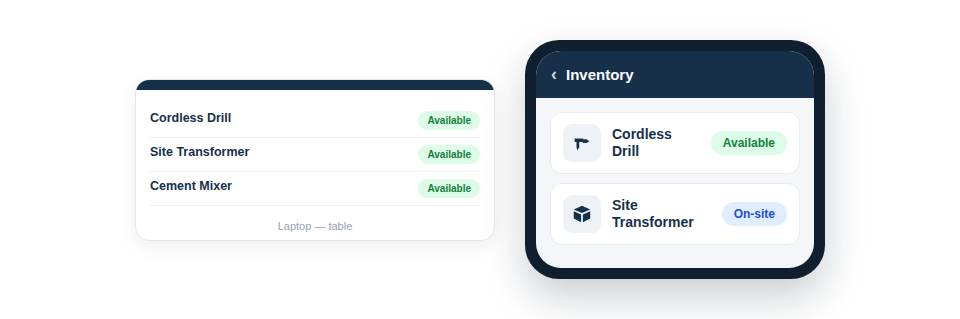
The right view for the device
You don’t choose a mode or flip a setting; the interface adapts:
- On desktop, a multi-column table built for scanning, sorting and managing many items at once — ideal for setup, reviews and bulk work in the office.
- On mobile, clean cards showing a photo and the key details, sized for thumbs and easy to use one-handed on site.
- The same data, instantly, with no separate app to install and no syncing to wait for — because it all runs in the browser.
Work anywhere, on whatever you’ve got
The deeper benefit is that there’s nothing to install, nothing to keep updated, and no second system to learn. Whoever is up a ladder uses the same live inventory as whoever is at the office desk, each seeing it in the form that suits them. A change made on a phone on site shows immediately in the office table, and vice versa, because they’re two windows onto one set of records rather than two separate tools.
In practice this means:
- Manage and review in depth at a desk, using the full table and bulk tools.
- Find, scan and update on site from a phone, using the card view.
- Trust that both are always showing the same current truth.

Best Practice: Use the desktop table for the heavy lifting — initial setup, big tidy-ups and bulk actions — and lean on the mobile cards for the quick, in-the-moment lookups and updates that happen out on the job.
For more, see Desktop Table vs. Mobile Card View.