
Public QR codes are one of the simplest ways for tradespeople to stay contactable long after the van has left the drive. You finish a clean install, the customer is delighted, and then a year passes — the service is due, the part needs replacing, and your number is buried in an old email thread. By the time they go looking, they have already searched online and called someone else. That gap between a happy customer and a forgotten contact is where a lot of repeat business quietly disappears.
A small scannable code, left on the work itself, closes that gap. It puts a permanent, findable link to your details right where the customer will look first: on the kit you installed or the tool that walked off site.
Public versus private QR codes
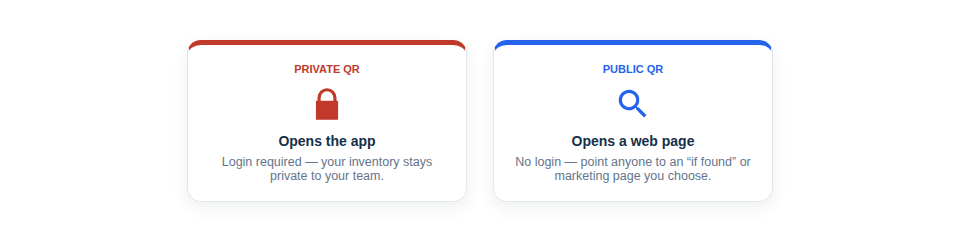
Asset Giant lets you choose, per asset, whether its QR code is public or private. The difference is who can see what when the code is scanned.
- A private QR code is for your team. Scanning it inside the app pulls up the full asset record — check in and out, booking history, location, notes and the rest.
- A public QR code links to a simple public asset page that shows only the information you choose to make visible. Anyone who scans it with a normal phone camera can see that page — no login, no app.
That public page is the whole point here. It is a page anyone can reach, so it is perfect for the things you actively want a stranger or a customer to see: who you are, what the item is and how to get in touch.
An honest note on what a public QR does
It is worth being clear, because it changes how you use it. A public QR code links to a public page. That is what it does. It does not send you a notification when someone scans it, it does not capture the scanner’s details, and it is not a marketing automation system. The repeat business comes from how you put that page to work — what you choose to show, and where you choose to leave the code. The examples below are all practical uses of that one simple capability.
Three ways public QR codes bring repeat business
1. A plumber leaves a code on the boiler
You install a new boiler. Before you pack up, you stick a public QR code on the casing or inside the cupboard door. On the public page you put the unit details and your contact information.
A year later the annual service is due, or the homeowner hears a noise they do not like. They open the cupboard, scan the code with their phone, and there you are — the firm that fitted it, one tap from a phone call. No rummaging for paperwork, no searching for “boiler engineer near me” and landing on a competitor.
2. An AV or hire firm tags installed kit
You install or supply kit into a venue — screens, speakers, rigging, staging. Tag each piece with a public QR code that identifies the item and points back to you.
When the venue runs its next event and needs the same setup, a staff member can scan the kit, confirm exactly what it is, and contact you to re-hire or rebook. Instead of being “that company we used once,” you are the obvious, scannable choice sitting on the equipment they already trust.
3. An honest finder returns your tool
Not every example is about sales — some are about not losing money in the first place. Put a public QR code on your tools, and if one is left behind or picked up by mistake, an honest finder can scan it and reach a page that says whose it is and how to return it.
A recovered SDS drill is a tool you do not have to replace, and a small everyday way a public code earns its keep.
How to set one up
Setting an asset’s QR code to public takes seconds inside Asset Giant:
- Catalogue the item — you can let the AI do the heavy lifting from a photo, then confirm the details.
- Open the asset and choose public for its QR code visibility.
- Add the QR label to your print queue, print it, and stick it on the boiler, the kit or the tool.
That is it. From then on, the code is live and the public page is reachable by anyone who scans it.
Keep it honest, keep it simple
Because the public page only shows what you decide to make visible, you stay in control. Show your name and contact details and the item; leave out anything internal. There are no internal reference numbers on display, no clutter — just a clean page that does one job well.
Public QR codes work best as part of a wider habit of tracking everything you own and install. If you are already cataloguing your kit, building your van inventory and managing jobs in one place, turning on public codes is a five-second add-on that keeps paying you back. See how it fits with the rest in the full feature list, or follow the build-your-inventory-with-AI guide to get your assets in fast.
You can start for nothing. The Free Forever plan includes QR labels and public codes, so you can tag your first boiler, screen or drill today and see how it lands with customers.
For more on getting set up quickly, read van inventory in an afternoon and plan materials, procurement to public QR.