
An equipment booking calendar solves the quiet, expensive problem every busy firm knows too well: two crews promised the same SDS drill on the same morning, or a £4,000 set of flight cases gathering dust in the store because nobody knew it was free. When kit is double-booked, someone drives across town for nothing or hires in at short notice. When kit sits idle, you have paid for an asset that earns you nothing. Both quietly eat your margin, and neither shows up cleanly on a spreadsheet.
The fix is not more phone calls or another shared spreadsheet that is out of date by lunchtime. It is one shared view of what you own, where it is, and when it is spoken for. That is exactly what booking your tools and equipment to jobs and dates gives you.
Why a booking calendar beats the WhatsApp scramble
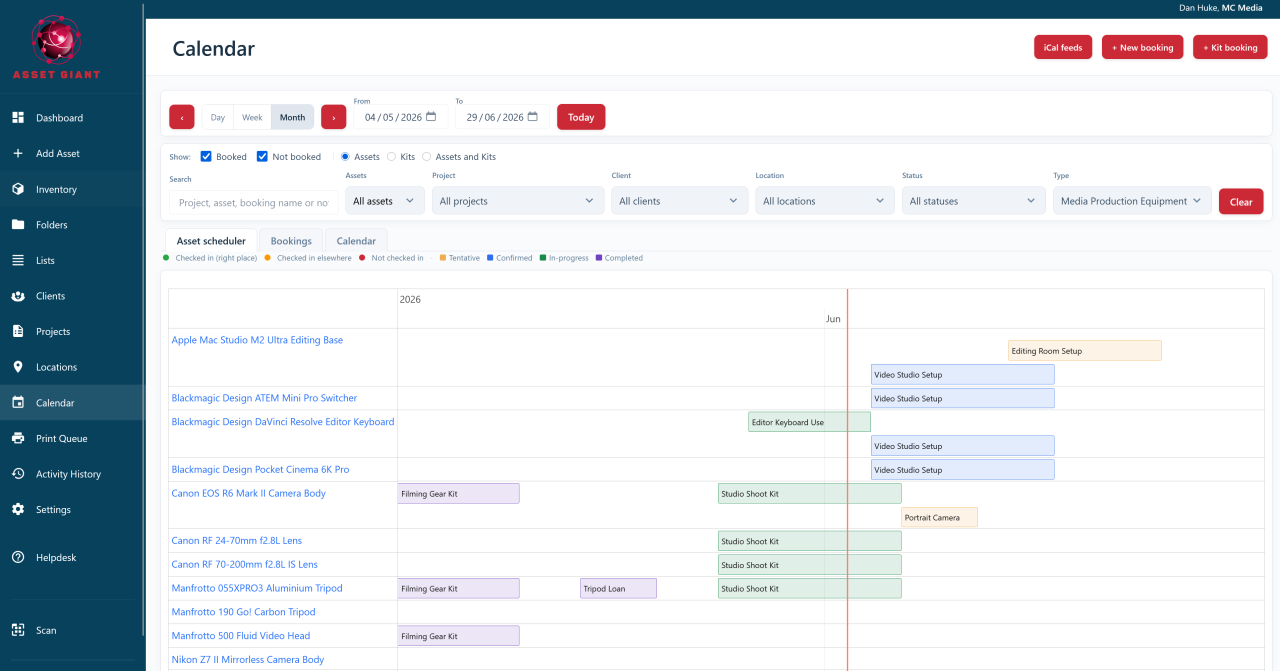
Asset Giant lets you book any asset, kit or list to a date range and tie it to a project or client. The moment something is reserved, everyone looking at the calendar can see it. There is no separate ritual to keep updated, because the booking lives on the same record as the tool itself, alongside its photos, documents, notes and history.
What that gives you in practice:
- No more double-booking. When a tool is already reserved for a job, you can see the clash before you promise it to a second crew.
- No more idle kit. A glance at the calendar shows what is free on any date, so expensive assets get used instead of stored.
- Bookings tied to real jobs. Reserve assets for a specific project or client, so the calendar reflects the work you have actually won.
- The whole kit at once. Book a saved list or kit in one move, rather than chasing twelve items individually.
A trades scenario: two sites, one mixer
Say you are running two refurbishments at once. Site A needs the cement mixer Monday to Wednesday; Site B wants it Thursday to Friday. You also have two SDS drills shared across both crews.
In the booking calendar you reserve the mixer to Site A’s project for Monday to Wednesday and to Site B for Thursday to Friday. The drills get booked the same way. Now the clash that used to surface at 7am on a wet morning shows up days earlier, on screen, while there is still time to hire in or reshuffle. When the kit goes out, your team checks it out on their phones; when it comes back, they check it in. The activity history records who had what and when, so nothing quietly disappears between sites.
An events and hire scenario: kit for the shoot weekend
For an events or hire firm, the calendar earns its keep just as fast. Imagine a shoot weekend that needs a set of flight cases, a lighting kit and a couple of stands. You save those into a list once, then open the list and hit Create booking — the whole lot goes onto the client’s project for the Friday-to-Sunday window in one action.
Because everything is checked together, you instantly see whether any item is already promised elsewhere. If a single case is committed to another job, you spot it now, not when the van is half-loaded — and rather than leaving you stuck, Asset Giant offers to find a window where the whole kit is free, book just the pieces that are available, or suggest a similar case that is. And because each booking sits against a client and project, you have a clean record of what went where, ready for the next quote or the post-job stocktake.
Share the schedule with an iCal feed
The booking calendar does not have to live only inside Asset Giant. You can export an iCal calendar feed and subscribe to it from Google Calendar or Apple Calendar, so your bookings appear right alongside your other appointments.
| You want | How the feed helps |
|---|---|
| Your own diary to show kit bookings | Subscribe a personal calendar to the iCal feed |
| The office and the field to agree | Everyone views the same live feed |
| One source of truth | Bookings update in your calendar app automatically |
That means a project manager living in Google Calendar and a foreman on Apple Calendar can both see the same reservations without logging into anything new.
Bring it together with lists and your data
Bookings work best when your kit is already organised. Build the gear you take to a job into a reusable checklist first, then book that whole list to a date in one move — see build and use lists as checklists. And when you simply want to know what is free next Tuesday, you can ask your inventory with the AI chatbot instead of scrolling.
If you are still getting your kit into the system, the AI cataloguing tools make light work of it — see how to build your inventory with AI, then explore the full feature set.
You can start scheduling your tools today on the Free Forever plan — no card needed. Create your free account and book your first job onto the calendar in minutes.