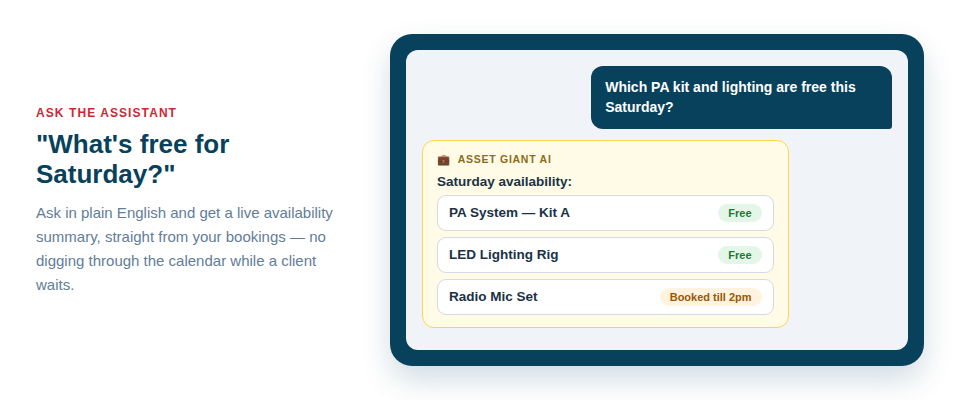
You know the kit is in there somewhere. The trouble is finding it. With an inventory chatbot you stop scrolling through filters and tapping through pages, and simply type the question the way you’d say it out loud — “which tools are out on the Smith job?” — and get the answer back. For a busy trades or events owner, every minute spent hunting through a spreadsheet on a phone screen is a minute not spent on the actual work, and those minutes add up fast across a week.
Asset Giant’s AI chatbot sits on top of everything you’ve already recorded — your assets, projects, clients, locations and bookings — and reads it the way a member of staff who knows your stock inside out would. You ask in normal language; it answers.
Why “ask your inventory” beats digging through it
Search and filters are fine when you know exactly what you’re looking for. But on site, mid-job, with one bar of signal, you rarely want to set up a filter — you want an answer. The point of the inventory chatbot is to skip the navigation entirely. Instead of remembering which screen shows what, you describe what you need and let the assistant do the looking.
That matters most in the moments when you’re under pressure: a client’s on the phone asking when their kit comes back, a foreman wants to know what’s already on the van, or you’re quoting a job and need to know whether you own enough of something to cover it without hiring in.
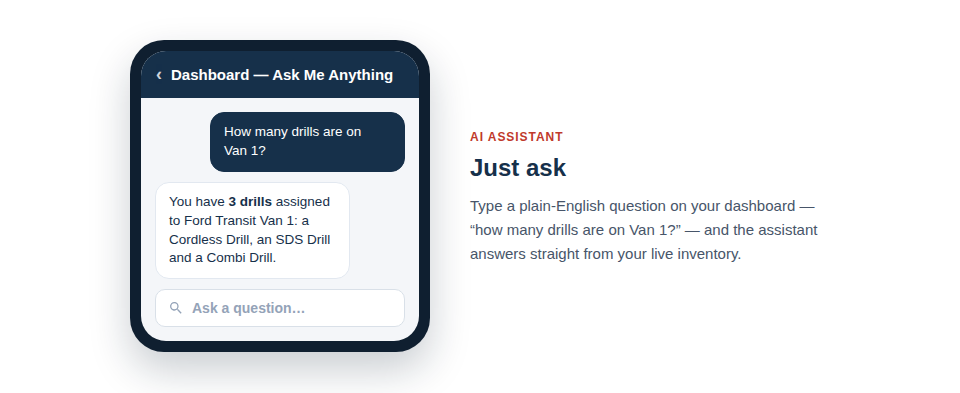
Real questions you can actually ask
The chatbot understands the way owners and crews really talk. A few examples you might type on any given day:
- “Which tools are out on the Smith job?”
- “What kit is free next Tuesday?”
- “How many drills do we own and where are they?”
- “What’s assigned to Dave?”
- “Show me everything booked out this week.”
- “Which assets are due back today?”
- “What does the lighting kit for the Henderson wedding include?”
Because it draws on your live data, the answers reflect what’s actually true right now — what’s checked out, what’s booked, who has what, and where it lives.
How it fits a real working day
First thing in the morning, you can ask what’s due back and what’s going out, and plan the day around the real picture rather than a guess. Out on site, a quick “what’s assigned to Dave?” settles who’s responsible for what before anyone leaves. When a client rings about availability, “what kit is free next Tuesday?” gives you something to promise on the spot instead of “let me check and call you back.”
The chatbot works alongside the rest of the system, not instead of it. The data it reads comes from the everyday things your team already does — cataloguing assets, scanning QR labels to check kit in and out, scheduling jobs on the calendar. The better that habit, the sharper the answers.
Honest about how it works
This is the important part, and we’d rather be straight with you than oversell it. The inventory chatbot answers from the data you’ve entered. It can only tell you about assets, projects, clients and bookings that exist in your account. If a drill was never added to the system, the chatbot won’t know it exists; if a job’s bookings were never recorded on the calendar, it can’t tell you what’s free that day.
In other words, it’s a brilliant way to ask your inventory — not a way to magic up information that isn’t there. The flip side is encouraging: the more you keep your records up to date, the more useful every answer becomes. And keeping records up to date is exactly what Asset Giant is built to make easy, whether that’s cataloguing kit from a photo with AI or scanning a QR label in a second.
If you’re feeding the AI photos, a little care pays off — see our guide to taking the best photos for AI identification. And to get straight answers about availability, it helps to schedule your tools on the calendar so the chatbot can see what’s booked.
Try it on your own kit
The best way to understand the inventory chatbot is to ask it about your own stock and watch it answer. Asset Giant’s Free Forever plan lets you add your assets, record a few jobs and start asking questions without spending a penny. Add the kit you’d most often go hunting for, then ask where it is — and see how it feels to get the answer back in seconds instead of minutes.