
When you customise asset tracking to match how your team really operates, the system finally starts working for you instead of against you. Most generic inventory tools force you into their boxes: a fixed set of fields, a rigid list of statuses, one flat way to group things. You end up cramming the PAT test date into a “notes” box, inventing codes nobody understands, and explaining the workarounds to every new starter. The detail you actually care about goes missing exactly when you need it.
That friction has a cost. A site supervisor can’t see whether a piece of plant is due for inspection. A hire desk can’t tell at a glance what’s out, what’s being repaired, and what needs reordering. Time leaks away in spreadsheets and second-guessing. Asset Giant takes a different approach: it gives you the building blocks and lets you tune them to your trade.
Add the custom fields you actually care about
The fastest way to customise asset tracking is to record the things that matter to your business — and nothing you don’t. In Asset Giant you create your own fields, so each asset carries the details your team relies on.
A builder might add a PAT test date and next inspection due. An events or hire company might add a daily hire rate, a flight-case number, and a condition grade. Whatever you add becomes part of the asset, visible when you scan a QR label on site and exportable to CSV or PDF when you need a report.
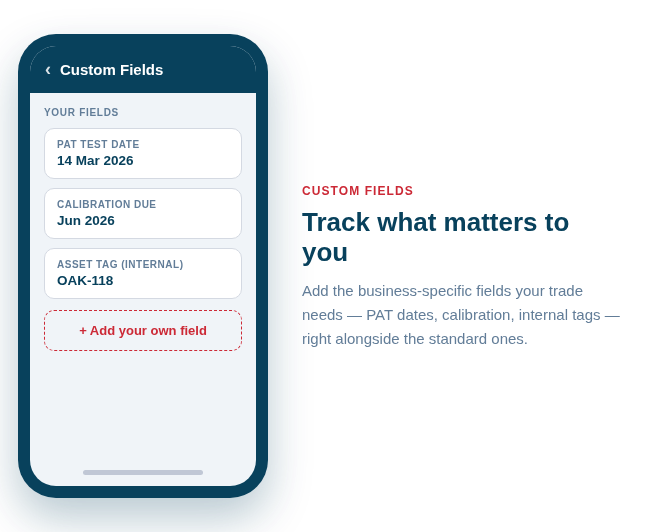
A few fields earn their keep almost everywhere:
- Compliance dates — PAT test, LOLER, calibration or service due
- Commercial detail — hire rate, replacement value, purchase date
- Physical location codes — bay, shelf, vehicle or flight-case reference
- Ownership and supplier — who bought it, who to reorder from
You don’t need to design the perfect schema on day one. Start with two or three fields you wish you had today, and add more as your process settles.
Define statuses that match your workflow
Off-the-shelf tools tend to offer “available” and “unavailable” and leave it there. Real work has more shades than that, so Asset Giant lets you define your own custom statuses to mirror the journey an asset actually takes.
A trades business might run In service, In for repair, and Procurement needed. A hire or events outfit might prefer Available, On hire, Awaiting PAT, and Retired. Because the statuses are yours, everyone reads them the same way — and your activity history, stocktake, and exports all speak your language.
Example fields and statuses by sector
| Sector | Useful custom fields | Useful custom statuses |
|---|---|---|
| Construction & trades | PAT test date, next service due, vehicle assigned | In service, In for repair, Procurement needed |
| Media & events / hire | Daily hire rate, flight-case no., condition grade | Available, On hire, Awaiting PAT, Retired |
Organise with categories and folders
Once your assets carry the right detail, structure makes them easy to find. Use categories to group by type — power tools, access equipment, AV, cabling — and folders to nest things the way your stores or vans are laid out. Add manufacturers so you can filter by brand at a glance.
Good structure pays off the moment someone is standing in a busy store with a phone, trying to find the right kit fast. It also keeps your stocktake honest, because everything has a home.
Group work with lists and kits
Lists are where the customisation comes together. Build a list once and reuse it as a checklist — a van load-out, a site PAT round, a show kit — then export it to PDF for sign-off. Pair lists with check in/out and the booking calendar, and you’ve turned loose assets into a repeatable process your whole team can follow.
For more on getting lists working hard, see our guide to building and using lists as checklists, and for the reorder-to-label workflow read planning materials procurement through to public QR.
Make it yours, for free
You don’t have to bend your business to fit the software. Explore what’s possible on the features page, or start shaping the system around your own fields, statuses and lists on the Free Forever plan — no card needed, just the tools to make asset tracking finally fit the way you work.