
The gap between finishing a job and being paid for it is mostly friction. The invoice is a PDF in an email. Paying it means finding the bank details, opening a banking app, typing a sort code, and getting the reference right. Every one of those steps is somewhere the payment can stall for a fortnight. An invoice payment link removes all of them: the client opens the document you already sent and taps a button.
Where the money goes — the important bit
You connect your own Stripe account. When a client pays, the charge is created directly on that account, so you are the merchant of record and the money lands in your Stripe balance.
Asset Giant never holds it, never routes it, and takes no cut of it — not a percentage, not a fixed fee, nothing. Stripe’s own processing fees apply exactly as they would if you billed through Stripe directly, and a dispute is handled in your own Stripe dashboard where it belongs.
We built it that way on purpose. The moment a software company sits in the middle of your customers’ money it acquires obligations, and you acquire a second party to chase when something goes wrong.
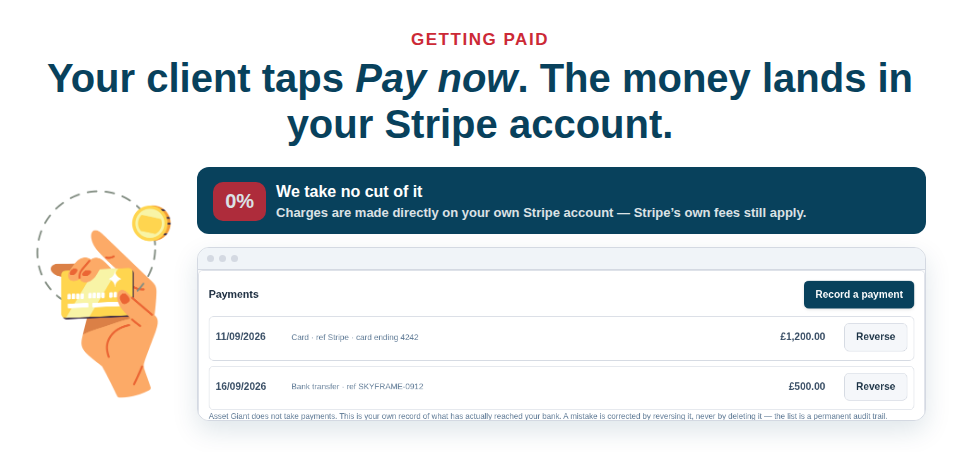
The payment records itself
This is the part that saves the most time and gets talked about the least. When a card payment succeeds, Stripe tells Asset Giant, and the payment is written onto the invoice: amount, date, method Card (Stripe), and Stripe’s own reference. The invoice moves to part paid or paid at the same moment. There is no import step and nothing to reconcile by hand at the end of the month.
A refund made in Stripe comes back the same way, as its own negative row that walks the invoice back off “paid”. No credit note is raised automatically, because crediting an invoice is a VAT act and a person should decide to do it.
Everything else still goes in the same ledger
Most trade money does not arrive by card, and the ledger is built for that. Bank transfers, cheques, cash, a card machine on site — all recorded by hand in a few seconds, sitting in the same list as the online payments.
A mistake is corrected by reversing it, never by deleting it. Both entries stay. The list is a permanent audit trail, which is exactly what you want the first time a client insists they paid in March.
Knowing what you are owed
Three reports sit behind the Reports button:
- Aged owing — who owes what and for how long. Drafts never appear, and anything paid or credited in full drops off.
- Client balances — with credit notes shown separately and never counted as a payment.
- Tax report by rate — zero-rated, exempt and reverse-charge listed separately, credit notes subtracted.
Every client and every project also carries its own Financials tab, so “how much has this job actually brought in” is a page, not an afternoon.
Tax the way your country writes it
If you are outside the UK you name the tax whatever your country calls it — GST, TVA, sales tax — and that word appears on the document, in the totals and in the tax report. You add as many rates as you need, each with its own label, percentage and treatment. Nothing assumes twenty per cent and nothing assumes one rate.
UK VAT is handled properly too: multiple rates, zero-rated and exempt kept genuinely separate, the construction domestic reverse charge with the Section 55A wording, and simplified invoices where the value allows. If you are not VAT registered, nothing you send will ever call itself a VAT invoice — that is enforced in code, not left to a setting.
What it costs
Card payments are on our paid plans. Free Forever still raises, sends and tracks invoices and records payments as they arrive; upgrading adds the Pay now button your client sees. You are never obliged to use it either — your bank details and payment terms print on the face of every document.
The full walkthrough is in Getting Paid and Recording Payments. See the plans and get the next invoice paid before you have left the site.