
It is usually the detail and the presentation on a quote that wins the work, not the number at the bottom. Two firms quote the same job for roughly the same money; the one that sets out what is included, section by section, in language the customer can follow, is the one that gets the call back. Asset Giant is built to let you produce that document.
Every kind of line the job needs
A quote, invoice or credit note takes as many lines as you like, of any of these kinds, in any order:
- Hire — an asset on one of its rate bands, priced across the period by the charge calendar.
- Sale — an asset sold outright rather than hired, priced from the sale price on its record. No dates, no charge calendar.
- Rate item — labour grades, call-out, delivery, waste disposal, plant hired in. A separate record type, so a labour line never counts against your asset allowance.
- One-off line — anything you type, priced there and then, with no source record anywhere.
- Deposit — a security deposit, never taxed.
- Discount — manual, and negative.
Hire and sale sit on the same document as a matter of course, so the generator, the two jerry cans of fuel and the length of ducting that is never coming back are all on one piece of paper.
The parts that make it read properly
This is where a quote stops looking like a till receipt:
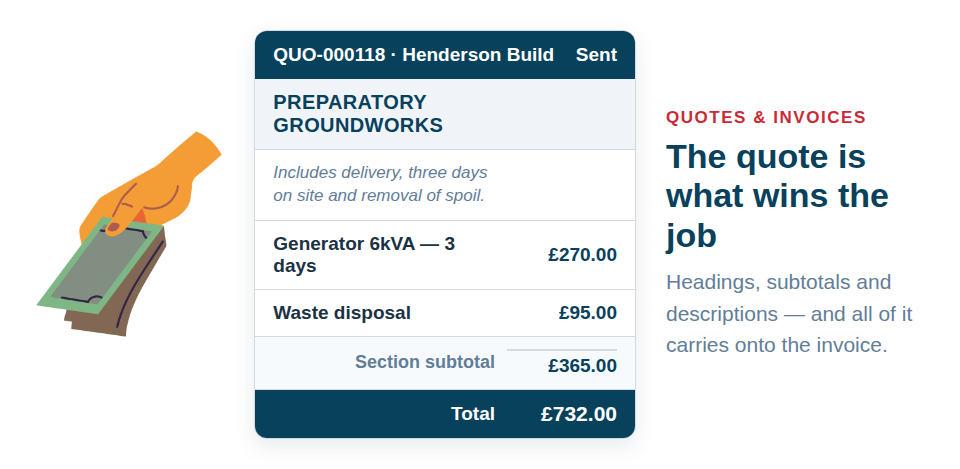
- Headings. Break a long quote into sections the customer recognises — “Preparatory Groundworks”, “Week One Plant”, “Making Good”.
- Subtotals. A subtotal line adds up the money lines since the last heading, on its own. You never type the figure, so it cannot go stale when you change a price above it.
- Descriptions. An unpriced paragraph under a heading, explaining what that section covers and what it does not. This is the part that answers the question the customer was going to ring you about.
Put together, a two-page quote reads as four clear sections with a price against each, rather than thirty undifferentiated rows.
Your standard wording, set once
Boilerplate you would otherwise retype every time lives on your company record and carries onto everything you send:
- Hire terms on quotes.
- Payment instructions on invoices.
Each can be shown or hidden per document, so a quote for a long-standing account can go out lean and one for a new customer can carry the full terms.
Win the job, and the whole thing carries over
Convert the quote and every line comes across onto the invoice — hire lines, sale lines, rate items, one-offs, and the headings, subtotals and descriptions that made it read well. The invoice arrives as a draft, so you can still edit it: add the extra day the job actually ran to, drop the item they decided against, adjust a description.
Nothing is frozen behind your back and nothing has to be rebuilt from scratch. The document the customer accepted is the document you bill from.
Stock, if you want it
Two independent settings under Settings → Hire & Invoicing control what issuing an invoice does to your quantities. Both default to off.
- Reduce asset quantity when invoices are issued — the sold units come off Quantity on Hand.
- Invoices cannot be issued if asset quantity is too low — an invoice that would oversell cannot be issued.
Block without reducing is a valid combination, for a company whose stock is counted elsewhere and who only wants to be stopped from promising twenty-four sheets when there are eighteen on the rack. If an issue is blocked you get a plain refusal naming the short items, each linking to the asset record, and the document number is not used up.
Only invoices move stock. A quote is not a sale, and a credit note is a sale coming back.
Two small rules worth knowing
- Blank and zero are different. Blank means “type a price on the line”. Zero means “this item is free”. If you never sell an item, leave its sale price blank — you can still type a price straight onto the document on the day somebody asks.
- Add items with no sale price and you are told. One clear warning, rather than a silent £0.00 reaching the customer.
Sale prices and all three hire bands travel through CSV import and export, so prices already in a spreadsheet load in one go: Importing Your Existing Spreadsheet.
Building the document is covered in Creating Quotes and Invoices, and setting the prices behind it in Pricing a Hire. Quotes are unlimited on every plan — start free.