
Anyone who hires kit out has had the same conversation twice in one week. A customer wants the generator for twelve days. Your day rate is £30 and your week rate is £150. You do the arithmetic on the back of a delivery note, get £300, and hope you have not undercut yourself. Then the same job comes in a fortnight later and somebody else in the office quotes £360, because they charged twelve days.
That is not a pricing problem. It is a problem of where to keep the pricing, and it is what equipment hire software is actually for.
Three rate bands per asset
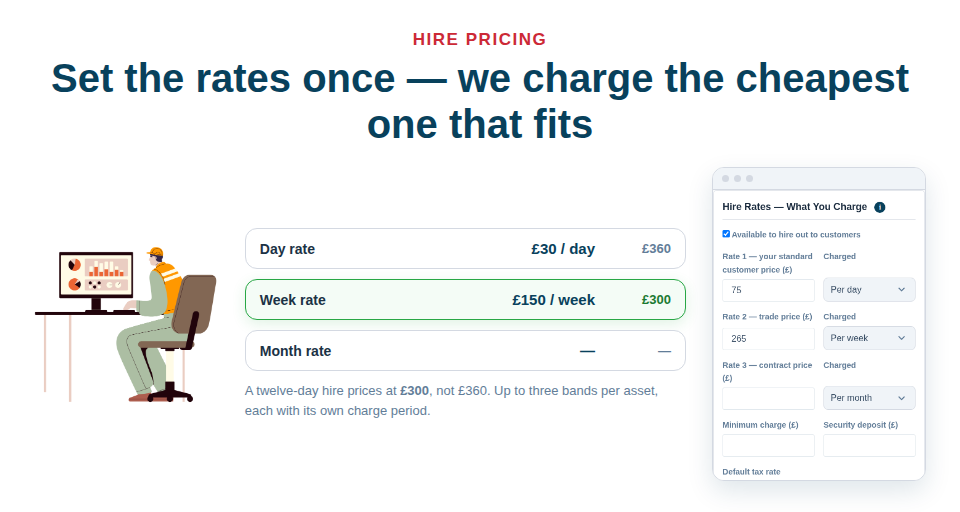
Every asset can carry up to three hire rates, each with its own charge period — hour, day, week, month, or a fixed charge regardless of duration. In practice the three bands map onto how most yards already work:
- Rate 1 — your standard customer price
- Rate 2 — your trade price
- Rate 3 — your contract price
Asset Giant prices every band it holds over the dates given and charges the one that produces the lowest total. Twelve days at £30 a day, against £150 a week, comes out at £300, not £360 — automatically, every time, whoever raises the quote. If the customer is on trade or contract terms you pick that band yourself and it is used regardless.
A blank rate means “not offered”, so an asset with no rate never turns up as a priced hire line. The same card also holds a minimum charge, a security deposit and the tax rate that normally applies.
The charge calendar, set once
The other half of hire pricing is not the rate, it is which days you count. Under Settings → Hire & Invoicing you set that once and it applies to every hire line afterwards:
- Chargeable days — tick the days you actually bill for. Monday to Friday turns a Friday-to-Monday loan into one chargeable day, not three.
- Week length — how many charge days make a week.
- Part periods — round up to a whole period, round to the nearest half, or charge strictly in proportion.
- Minimum hire — a floor in days.
- Grace hours on return — so a van back at nine in the morning does not become another day.
It shows its working
Open the Details panel on any hire line and it tells you, in plain words, which rate it priced from, the period, how many periods, and any discount: “three days at £120, less ten per cent”. The number of periods is editable and the line total can be overridden outright, because there is always a job where you did the customer a favour.
That matters more than it sounds. A price you cannot explain at the door is a price you end up discounting.
Quote, invoice, credit note — one document, three states
A quote can be accepted, declined or left to expire, and converts into an invoice once. The invoice is numbered sequentially, frozen the moment it is issued, moves itself from issued to part paid to paid, and goes overdue on its own when the due date passes. A credit note cites the invoice it relates to on its face, and you can raise more than one against the same invoice for partial credits.
On the document itself you get hire lines, sale lines, saved rate items (labour day rates, call-out, delivery, disposal, operator hourly), free-text lines, section headings and subtotals wherever you want them — all drag-reorderable. Rate items are a separate record type on purpose, so a labour line never eats into your asset allowance.
Send it the way the client will actually open it
Download the PDF, email it from inside the app with a copy to yourself, or send a private share link the client opens on their phone with no account and no login. Once it has been emailed, a Sent marker appears beside the status so nobody sends it twice.
And because the same job comes round again, save any quote as a template. A template holds the lines, rates, quantities, tax rates and terms — but deliberately no dates and no frozen prices, so it re-prices against today’s rates over whatever dates you give it. That is covered in Using Quote and Invoice Templates.
The step-by-step is in Pricing a Hire and Creating Quotes and Invoices. Quotes are unlimited on every plan, including Free Forever — set your rates up free and price the next job once.